Why Can't I Hear 17 kHz? What a Failed Mosquito Tone Hearing Age Test Really Means
Fast answer: If you cannot hear 17 kHz, do not panic. Many adults lose sensitivity at the top edge of hearing, and many laptop speakers, phone speakers, Bluetooth codecs, and cheap earbuds cannot reproduce 17 kHz cleanly anyway. Retest with wired headphones, low background noise, and short tones before treating the result as a sign of hearing loss.
Search forums are full of the same question: why can't I hear 17 kHz if I am only in my 20s or 30s? The honest answer is that a 17 kHz result is a messy mix of biology, hardware, volume, codec, browser, and test method. A proper hearing age test can be useful, but it is not the same thing as a calibrated audiogram.
This guide explains what 17 kHz means, why the 17.4 kHz mosquito tone became popular, when a high-frequency result is normal, and how to run an online hearing check without fooling yourself or hurting your ears.
What 17 kHz Actually Measures
A 17 kHz tone is near the upper edge of normal adult hearing. It is far above most speech fundamentals and far above the frequencies that make voices intelligible in ordinary conversation. That is why failing a 17 kHz test does not automatically mean you have a serious hearing problem.
Age-related hearing loss, also called presbycusis, usually develops gradually and often affects both ears. The National Institute on Deafness and Other Communication Disorders notes that many factors can influence hearing as we age, including inner-ear changes, long-term noise exposure, medical conditions, and some medications. That is the medical background behind the informal idea of "hearing age."
What Does My Result Mean?
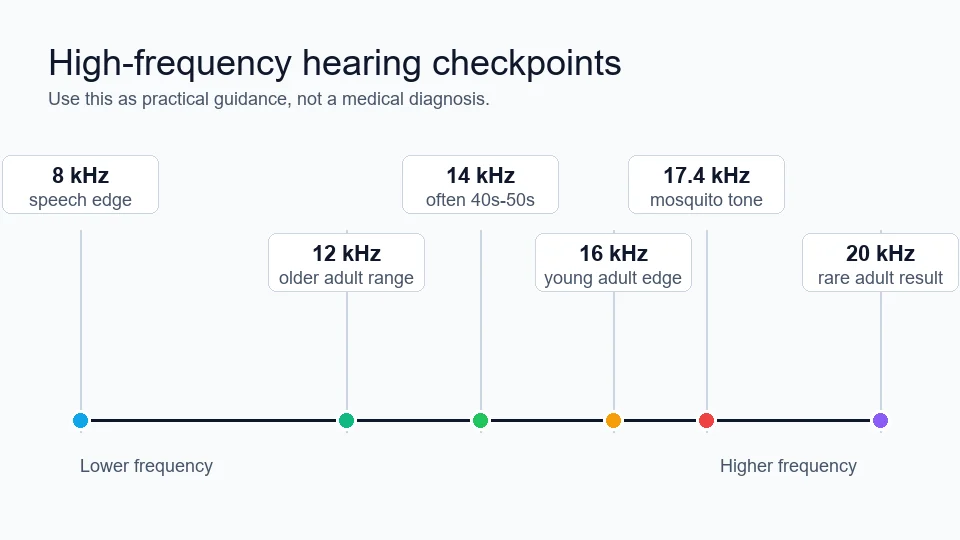
Use this table as practical guidance for an online hearing-age result. It assumes you used decent wired headphones, a quiet room, and a low but audible calibration tone. If you used phone or laptop speakers, treat the result as a speaker test first.
| Highest clear tone | Common interpretation | What to do next |
|---|---|---|
| 18-20 kHz | Very strong top-end hearing or high-volume/hardware-assisted result. | Retest at lower volume and check that you are not hearing distortion, clicks, or aliasing. |
| 17-17.4 kHz | Good extended high-frequency result for many adults. | Use the 17.4 kHz mosquito tone as a checkpoint, not as a medical grade. |
| 15-16 kHz | Common adult result, especially with everyday headphone use or noisy environments. | Retest with another wired headset before worrying. |
| 12-14 kHz | Can be normal with age, but can also reflect hardware roll-off. | Compare left and right ears, then try the same test on better headphones. |
| 8-10 kHz or lower | Worth taking seriously if confirmed on good equipment. | Get a clinical hearing test, especially if speech sounds muffled or one ear is weaker. |
Why Online Hearing Age Tests Can Lie
The biggest mistake is assuming silence always means your ear failed. At 17 kHz, the weakest link may be the playback chain.
1. Laptop and phone speakers often cannot play 17 kHz well
Small speakers are designed for speech, alerts, and compact music playback, not clean extended-high-frequency testing. If a laptop speaker cannot reproduce 17 kHz, no human ear can hear it from that speaker.
2. Bluetooth can change the top end
Bluetooth headphones may use codecs, noise processing, and power-saving behavior that make the highest tones quieter or less stable. That does not mean Bluetooth is bad for music, but it makes it a weaker reference for a hearing-age test.
3. Video tests are less controlled than generated tones
A video platform may transcode audio. A browser-generated sine tone is cleaner because the page creates the tone directly with the Web Audio API. MDN documents that the OscillatorNode frequency parameter is set in hertz, which is exactly the kind of browser primitive used by a tone-based test.
How to Run a Better 17 kHz Hearing Test
Use this workflow before you decide your ears are older than expected.
- Start with low volume. Play a lower tone first, such as 1 kHz or 8 kHz, and set it to a comfortable level.
- Use wired headphones if possible. This removes one major Bluetooth variable.
- Test one ear at a time. A left/right mismatch matters more than missing one extreme tone.
- Use short tones. Do not loop high-frequency tones loudly or repeatedly.
- Confirm across steps. If you hear 16 kHz but not 17 kHz, that is plausible. If you hear 20 kHz but not 15 kHz, suspect distortion or test error.
- Retest later. Temporary fatigue after loud music, travel, or a noisy workday can change what you notice.
Try it with the site tool: open the Hearing Age Test, use the quick mode first, then use Advanced Options for left ear, right ear, pulsed tone, and manual threshold checks.
If your only headphones are cheap earbuds or a wireless headset, it is worth borrowing or buying a wired pair for the retest. Our recent gaming headphone launches guide covers wired and wireless models with clear high-frequency response, which makes for a more honest 17 kHz reference.
What Is the 17.4 kHz Mosquito Tone?
The mosquito tone is a 17,400 Hz tone. AudioCheck describes its mosquito test as a steady 17.4 kHz sine tone plus a modulated version that moves between 17 kHz and 20 kHz. The reason it became famous is simple: younger listeners are more likely to hear it, while many adults cannot.
That makes it catchy, but not clinical. The mosquito tone is one checkpoint inside a wider high-frequency test. A better result comes from stepping through 12, 14, 15, 16, 17, 17.4, 18, and 19 kHz rather than judging your hearing from one tone.
Can You Still Enjoy Music If You Cannot Hear 17 kHz?
Yes. Most musical weight, voice intelligibility, rhythm, bass, midrange tone, and instrument identity live well below 17 kHz. The top octave can add air, hiss, edge, and spatial cues, but it is not where most of the song happens.
If someone says they heard "new details" in expensive headphones, that usually involves distortion, tuning, imaging, driver control, channel balance, and comfort - not only whether their ears reach 17 kHz. Use a frequency response test for playback hardware and a headphone and speaker test for channel balance before blaming your ears. Our walkthrough on checking left and right audio channels shows how to rule out a swapped or dead driver, which often masquerades as one ear "hearing worse."
When Should You Worry?
Do not worry just because you failed 17 kHz. Do pay attention if the result points to a real-world hearing issue.
Get checked by an audiologist or hearing health professional if:
- speech sounds muffled even in quiet rooms;
- one ear is clearly weaker than the other;
- you cannot hear much above 8-10 kHz on good wired headphones;
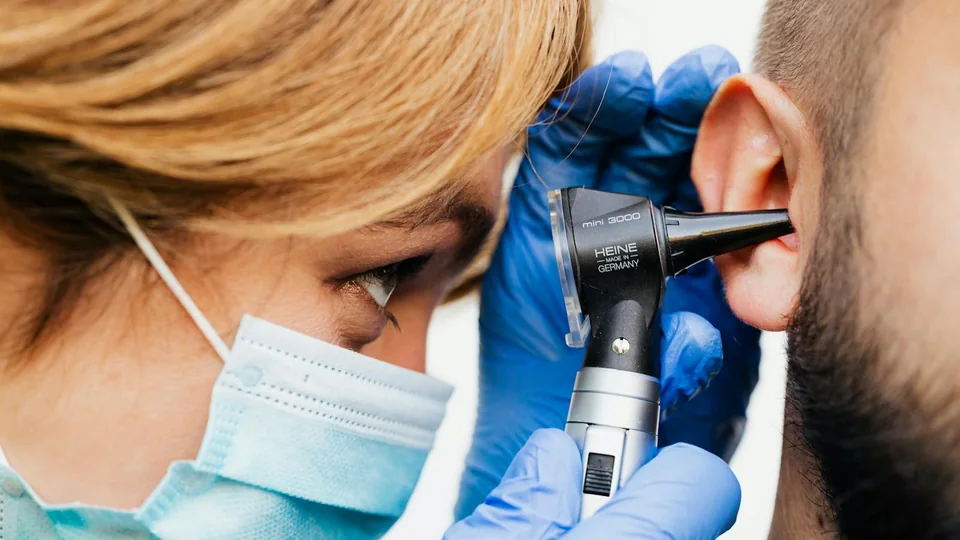
- you have ringing, pressure, pain, dizziness, sudden hearing change, or ear drainage;
- you recently had loud-noise exposure and your hearing feels dull afterward.
CDC/NIOSH guidance is clear that loud noise risk depends on level, duration, and repeated exposure. WHO safe-listening guidance also emphasizes keeping volume down, using well-fitted or noise-cancelling headphones in noisy places, and taking breaks. That matters more for long-term hearing health than chasing a louder 19 kHz result.
Quick Checklist Before You Trust the Result
- Retest with wired headphones, not laptop speakers.
- Keep the volume low and never chase the tone by blasting it.
- Test left and right ears separately.
- Use a browser-generated tone, not only a compressed video.
- Compare the pattern: 14, 15, 16, 17, and 17.4 kHz should decline logically.
- See a professional if real speech hearing is affected.
Related Tools
Use these tools together for a cleaner audio check:
Sources and Further Reading
- NIDCD: Age-Related Hearing Loss - background on presbycusis, gradual hearing changes, and when to seek hearing care.
- WHO: Safe listening guidance - practical volume and headphone-safety recommendations.
- CDC/NIOSH: Noise-induced hearing loss - noise exposure risk, 85 dBA guidance, and prevention basics.
- AudioCheck: Mosquito Tone Audibility Test - 17.4 kHz tone reference and safety warning.
- MDN: OscillatorNode frequency - Web Audio API frequency control used by browser tone generators.
- PubMed: Extended high-frequency audiometry in research and clinical practice - review context for testing above 8 kHz.
FAQ
Why can't I hear 17 kHz?
The most common reasons are normal high-frequency hearing changes, audio hardware that cannot reproduce 17 kHz cleanly, Bluetooth or browser processing, background noise, or a test volume that is too low. Retest with wired headphones before treating it as a hearing problem.
Is not hearing 17 kHz hearing loss?
Not by itself. Many adults cannot hear 17 kHz at normal levels, and speech understanding depends mostly on lower frequencies. If you struggle with conversation, hear one ear worse than the other, or cannot hear much below 8-10 kHz, get a clinical hearing test.
What is the 17.4 kHz mosquito tone?
The mosquito tone is a very high 17,400 Hz tone. It became popular as an informal hearing-age check because younger listeners are more likely to hear it, while many adults cannot.
Are online hearing age tests accurate?
They are useful for a quick screening and comparison, but they are not medical audiograms. Consumer speakers, headphones, volume settings, sample rate, and room noise can all change the result.
Should I use headphones or speakers for a hearing age test?
Use wired over-ear or in-ear headphones if possible. Laptop and phone speakers often roll off at high frequencies, so they can make a normal ear look older than it is.
Can I damage my ears with a 17 kHz test?
Any sound can become unsafe if it is too loud. Start at low volume, use short tones, avoid repeated high-volume attempts, and stop if the tone feels painful or leaves ringing.
Start safely: run the Hearing Age Test at low volume, confirm your highest clear tone, then use the advanced ear-specific mode if your left and right results feel different.