What This Gamepad Tester Measures
This is a full controller diagnostic that runs live in your browser using the standard Gamepad API — nothing to install, no account, and no input data ever leaves your device. Beyond lighting up buttons, it gives you the metrics that actually tell you whether a controller is healthy: a timed stick-drift test with a recorded verdict, a circularity / range sweep, an effective polling-rate (Hz) meter with jitter, an approximate input-latency reading, analog trigger and per-button pressure bars, an adjustable dead zone, and a fault detector that catches chatter, double-clicks and stuck inputs. You can export the results as JSON for a warranty or RMA ticket.
Reading Your Results: Thresholds That Matter
Each diagnostic has a healthy range. Use this table to interpret what the tool shows:
| Metric | Healthy | Borderline | Problem |
|---|
| Stick drift (resting magnitude) | ≤ 0.05 | 0.05–0.12 (mild) | > 0.12 — worn potentiometer |
| Circularity error | 0–5% (Hall-effect grade) | 8–15% (normal DualSense/Xbox) | 15–20%+ — worn or fake/squarish gate |
| Input latency (approx., relative) | < 20 ms wired | 20–30 ms | > 40 ms — check wireless/connection |
| Polling rate (effective) | USB ~125–250 Hz read in-browser | — | Heavy jitter = unstable link |
Polling reference: 125 Hz = 8 ms between updates, 250 Hz = 4 ms, 500 Hz = 2 ms, 1000 Hz = 1 ms.
Honest Measurement Caveats (Read This First)
A browser cannot read controller hardware the way a dedicated app or oscilloscope can, so we label results honestly rather than overstate them:
- Polling rate is the effective in-browser update cadence, not the true USB hardware poll rate. The Gamepad API is read once per animation frame, so readings are capped to roughly 60–250 Hz even if your mouse-grade 1000 Hz controller polls far faster at the OS level. A USB controller still usually reports ~1000 Hz to Windows; Bluetooth is typically 125–250 Hz.
- Input latency is approximate — it estimates how fresh the data is when the browser reads it, which is useful for comparing wired vs wireless on the same machine, but it is not a lab-grade, click-to-photon certificate.
- Event-driven controllers idle. Many pads (DualSense, Xbox over Bluetooth) report nothing until you move a stick or press a button, so the Hz/latency panels stay blank until you give them input — rotate a stick to wake them.
Button Labels and the “Standard” Mapping
The Gamepad API exposes a mapping value. When it is “standard”, button indices follow a fixed layout and the tool can label them correctly for your brand (A/B/X/Y on Xbox, Cross/Circle/Square/Triangle on PlayStation). When it is blank (common on the Switch Pro Controller and many generic USB pads), indices are not guaranteed, so the tool shows raw index numbers and a warning — a button labelled “A” may sit in a different physical spot. The standard index map is: 0 = bottom face, 1 = right face, 2 = left face, 3 = top face, 4/5 = bumpers, 6/7 = triggers, 8 = Select/Share/View, 9 = Start/Options/Menu, 10/11 = stick clicks, 12–15 = D-pad, 16 = Home/Guide/PS.
Stick Drift: How to Test and What to Do
Drift is when a stick registers movement with no input — your character walks, the camera pans, or menus scroll on their own. To test it properly, rest both sticks, leave the controller on a flat surface, and press Run 10s drift test. Recording over several seconds gives a stable verdict instead of a flickering live number. A recorded magnitude above 0.05 means the analog potentiometer’s wiper is wearing. The tool then auto-suggests a dead-zone value that would mask mild drift in-game, and you can apply it with the slider to see the effect. Even ~1% genuine drift is enough to nudge an FPS camera, which is why a small dead zone is the quickest software band-aid before a hardware fix. To understand what that suggested number means and where to enter it per game, read the controller deadzone guide; for the full repair-vs-RMA walkthrough, see our controller stick drift guide.
Circularity and Range: The Test Most Pads Fail Quietly
Hold a stick at full deflection and rotate a complete circle. The tool traces the swept path and measures how round it is. A worn or low-quality stick loses range in the corners, so diagonal inputs never reach full — you feel it as “my aim is fine left-right but sluggish on diagonals.” Below 5% error is excellent (typical of Hall-effect and TMR sticks); 8–15% is normal for stock DualSense and Xbox pads; 15–20%+ means a squarish gate, a worn module, or a counterfeit controller. The tool also reports the minimum and maximum radius so you can see exactly where range is being lost. Save the trace as a PNG for evidence.
Chatter, Double-Clicks and Stuck Inputs
The fault detector watches every button while you test. Chatter (a switch firing several times from one press) and double-clicks are flagged when a button registers multiple down-edges within a fraction of a second — the controller equivalent of a worn mouse switch. Stuck inputs are flagged when a button or trigger value never returns to zero. Flagged inputs are outlined in red and listed with a count. This is the objective evidence support teams ask for, so export the JSON report before you open an RMA. (Note: a browser cannot prove a phantom “ghost” press was hardware vs. an accidental touch, so we report chatter and stuck states, which are measurable, rather than over-claiming ghost detection.)
Notes by Controller Family
Xbox (One / Series X|S): reports a clean standard mapping and supports dual-rumble plus trigger rumble (the small impulse motors inside LT/RT) — a dedicated button appears when your pad exposes them.
PlayStation DualSense / DualSense Edge / DualShock 4: standard mapping with correct PS glyph labels and dual-rumble. The headline DualSense extras — battery %, gyroscope/accelerometer, touchpad coordinates, adaptive triggers and the lightbar — are not part of the standard Gamepad API; they require WebHID (Chrome/Edge desktop, with a permission click) and are planned as an optional advanced mode.
Nintendo Switch Pro Controller: often reports a non-standard mapping, so button indices may not match the printed letters — the tool will warn you and show raw indices.
Generic / 8BitDo / third-party: most expose a standard or XInput-style mapping; wheels, arcade sticks and HOTAS show their extra axes in the raw axes/buttons table.
How to Fix Faults & When to RMA
For mild drift or sticky behaviour, try the least invasive fixes first: recalibrate (PS5: Settings → Accessories → Controllers; Xbox: Accessories app), blow compressed air around the stick base, and clean around the module with 70% isopropyl alcohol on a cotton swab while rotating the stick. Update controller firmware. If drift or range loss persists, the analog module is worn: third-party potentiometer modules cost roughly $7–$20 and a repair shop typically charges $20–$40, while a permanent fix is upgrading to a Hall-effect or TMR controller. If your controller is in warranty, export the JSON report from this tool as evidence and open an RMA before attempting a repair that could void coverage.
Frequently Asked Questions
How do I use the online gamepad tester?
Connect your controller via USB or Bluetooth, open this page and press any button. The browser activates the Gamepad API and starts reading every input automatically. Buttons light up and show a press counter, triggers show an analog percentage, the analog sticks plot live on a canvas, and the diagnostic panels report polling rate, input latency, drift and circularity in real time.
Which controllers work with this gamepad tester?
Any controller exposed through the browser Gamepad API works: PS5 DualSense, PS4 DualShock 4, Xbox One and Xbox Series X/S controllers (wired or via the Xbox Wireless Adapter), the Nintendo Switch Pro Controller, and most generic USB or Bluetooth gamepads, wheels and arcade sticks. The tool auto-detects the brand to show the correct button labels.
How do I know if my controller has stick drift?
Leave both analog sticks untouched and run the timed drift test. The tool records the resting magnitude over several seconds and reports a verdict: a value above 0.05 at rest is a reliable sign of a worn potentiometer. It also suggests the dead zone you would need to mask mild drift in-game.
How do I test my controller's polling rate?
Open the polling-rate panel and rotate a stick so the controller keeps reporting. The tool measures how often the browser receives fresh data and shows the effective rate in Hz plus jitter. Note this is the effective in-browser update cadence (capped by the browser's animation frame, roughly 60–250 Hz), not the controller's true USB hardware poll rate. USB controllers usually report ~1000 Hz to the OS; Bluetooth is typically 125–250 Hz.
What is a stick circularity test and why does it matter?
Hold a stick at full deflection and rotate a complete circle. The tool traces the path and measures how round it is. A circularity error of 0–5% is excellent (typical of Hall-effect sticks), 8–15% is normal for most DualSense and Xbox pads, and 15–20%+ suggests a worn, squarish gate or a low-quality/fake controller that loses range in the corners — which hurts diagonal aim.
Can this tool detect button chatter or double-clicking?
Yes. The fault detector watches every button for chatter (multiple rapid press/release cycles from one press), double-clicks, and stuck inputs (a button or trigger whose value never returns to zero). Affected inputs are flagged so you have objective evidence for a warranty or RMA claim.
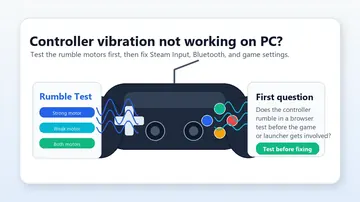
Why is the vibration test not working?
Vibration uses the Gamepad Haptics API (vibrationActuator.playEffect), supported in Chrome, Edge and other Chromium browsers on Windows and Android. It is not available in Firefox or Safari, where the tool shows an “unsupported” note instead of failing silently. Also confirm vibration is enabled in your OS or console settings. Trigger rumble only appears on Xbox controllers that expose impulse-trigger motors.
Do I need to download or install anything?
No. The tester runs entirely in your browser using the standard Gamepad API. Nothing is installed, no account is needed, and no input data leaves your device — everything is processed locally.