
Do You React Faster to Sound or Sight?
Fast answer: Yes, you react faster to sound than to sight, by roughly 20-40 milliseconds. Auditory signals reach the brain in about 8-10 ms, while visual signals need 20-40 ms of processing, so average auditory reaction times (~140-160 ms in lab settings) consistently beat visual ones (~180-200 ms). You can verify this yourself in under two minutes: run five trials on a sound reaction test and five on a visual reaction test, then compare your averages.
Run the Experiment Yourself: 5 Sound Trials vs 5 Sight Trials
Every page that ranks for this question just asserts the answer from a study. The honest way to settle it is to reproduce the finding on your own hardware, with the same finger and the same input chain, so the only thing that changes between the two tests is the sense being measured.
- Plug in wired headphones: Use wired output for the sound test so Bluetooth latency cannot distort the result.
- Run five sound trials: Open the auditory test, wait for the beep, then press the key. Record your average.
- Run five sight trials: Open the visual test, wait for the color change, then press the same key. Record your average.
- Discard any false starts: A click before the cue is anticipation, not reaction. Redo that trial so the average stays honest.
- Compare the two averages: Your sound average should be the lower number. If it is much higher, check for Bluetooth audio.
Auditory Reaction Time Test: Wait for the beep, then press. Measures sound response in milliseconds with false-start detection.
Visual Reaction Time Test: Click when the color changes. The visual half of the experiment, in the same browser.
Why Sound Beats Sight: 8-10 ms vs 20-40 ms
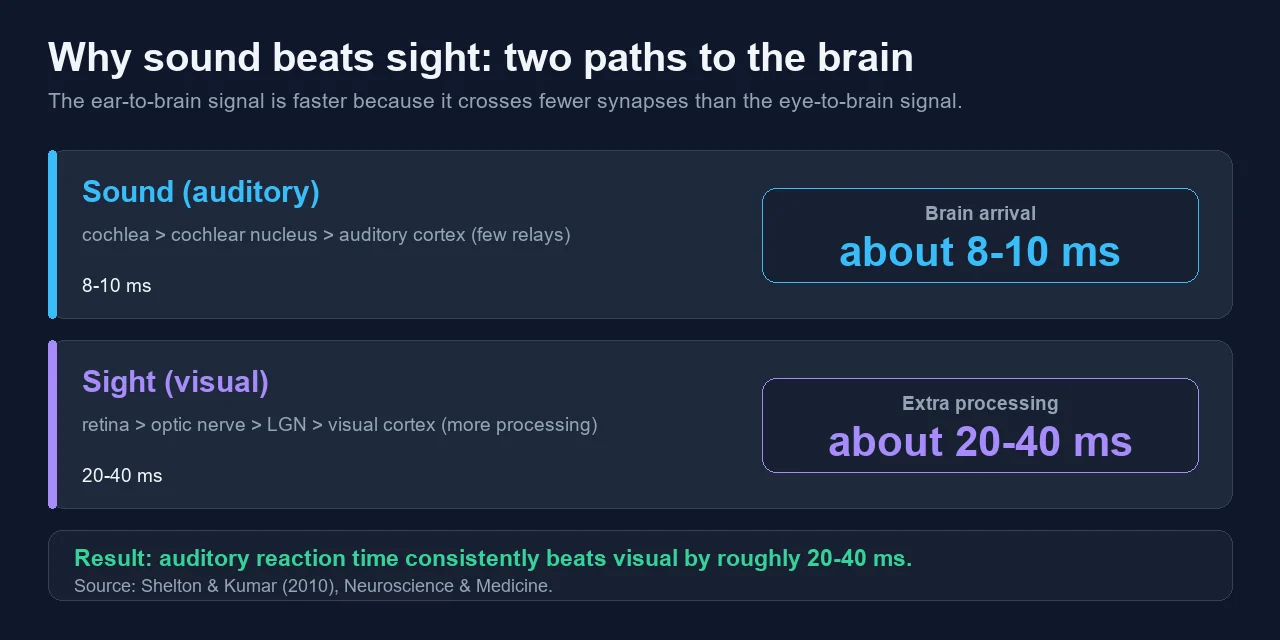
The gap is not about how fast your finger moves. It is about how fast the signal reaches the part of the brain that can decide to act. An auditory stimulus takes only about 8-10 ms to reach the brain, while a visual stimulus takes 20-40 ms, according to the reaction-time study by Shelton and Kumar in Neuroscience & Medicine (2010).
Sound has a short, low-relay path: the cochlea converts pressure waves to nerve signals almost instantly, then the signal crosses just a few synapses (cochlear nucleus, then on toward auditory cortex). Light takes longer because the retina runs a chemical phototransduction cascade, and the signal then travels through the optic nerve and lateral geniculate nucleus into the visual cortex, where edges and motion are processed before a decision is possible. In that same study the measured means were about 284 ms for sound and 331 ms for sight — the absolute numbers vary by method, but the ordering does not.
What Is a Good Reaction Time to Sound?
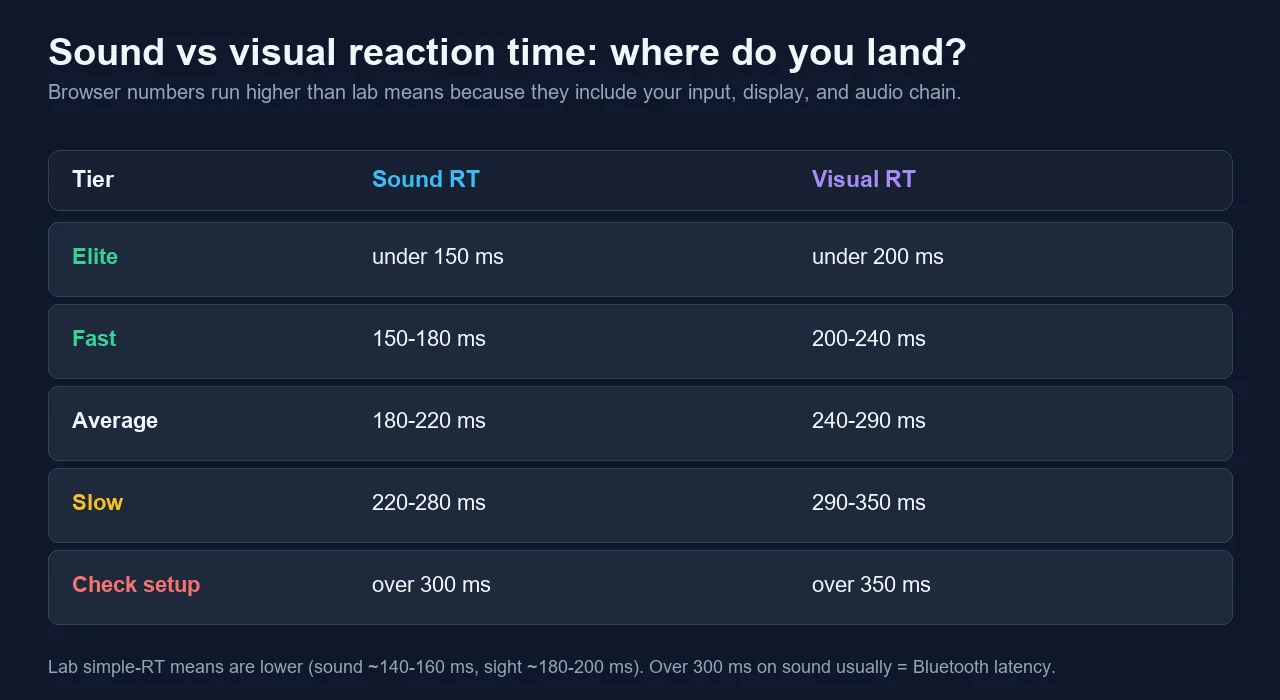
A good auditory reaction time on a wired browser test is roughly 180-220 ms for most adults, with quick, well-rested reactions landing around 150-180 ms. Pure lab simple-reaction means are lower (~140-160 ms) because a lab strips out the input and audio delay that a browser test cannot avoid. Use the table below as a practical guide, not a medical score — compare yourself against yourself across sessions.
| Good sound RT | Auditory Reaction Time Test | |
|---|---|---|
| Elite | under 150 ms | Pro-level reflexes, rare on a browser test with input delay. |
| Fast | 150-180 ms | Quick and well-rested, close to the lab simple-reaction range. |
| Average | 180-220 ms | Typical for most adults on a wired setup. |
| Slow | 220-280 ms | Fatigue, distraction, or early audio latency creeping in. |
| Check setup | over 300 ms | Almost always Bluetooth latency, not your nervous system. |
What Is a Good Visual Reaction Time?
A good visual reaction time online sits around 240-290 ms, and the widely cited average from large public datasets is roughly 250-280 ms. That looks slower than the textbook lab figure (~180-200 ms) for a simple reason: a click-based online test measures the whole chain — screen refresh, the moment your eye notices the change, your decision, the keypress, USB polling — not just the nervous system. The number is still useful as long as you keep the test conditions the same every time.
| Good visual RT | Visual Reaction Time Test | |
|---|---|---|
| Elite | under 200 ms | Top-tier, usually trained gamers on a high-refresh monitor. |
| Fast | 200-240 ms | Sharp reflexes with a low-latency display and input. |
| Average | 240-290 ms | Where most online click-based averages land (~250-280 ms). |
| Slow | 290-350 ms | Tiredness, a 60 Hz screen, or a laggy input chain. |
| Check setup | over 350 ms | Suspect display refresh, wireless lag, or a distracted run. |
The Headphone Trap: Bluetooth Adds 100-300 ms
This is the single mistake that ruins the comparison. If you run the sound test on Bluetooth headphones or earbuds, you are not measuring your reaction time, you are measuring audio latency plus reaction time. The SBC and AAC codecs that most wireless headphones use add roughly 150-300 ms of delay between the browser and your ears; measurement labs have recorded SBC latency near 283 ms on real headphones. That alone can flip the result and make sound look slower than sight.
The fix is simple: use wired headphones or wired speakers for the sound test. Wired output adds under ~10 ms, which is small enough to ignore. If your only option is Bluetooth, look for an aptX Low Latency or a dedicated low-latency dongle, but wired is still the cleanest way to keep the experiment honest. If your measured sound number is above 300 ms, suspect the headphones before you blame your reflexes.
How to Run a Fair Comparison
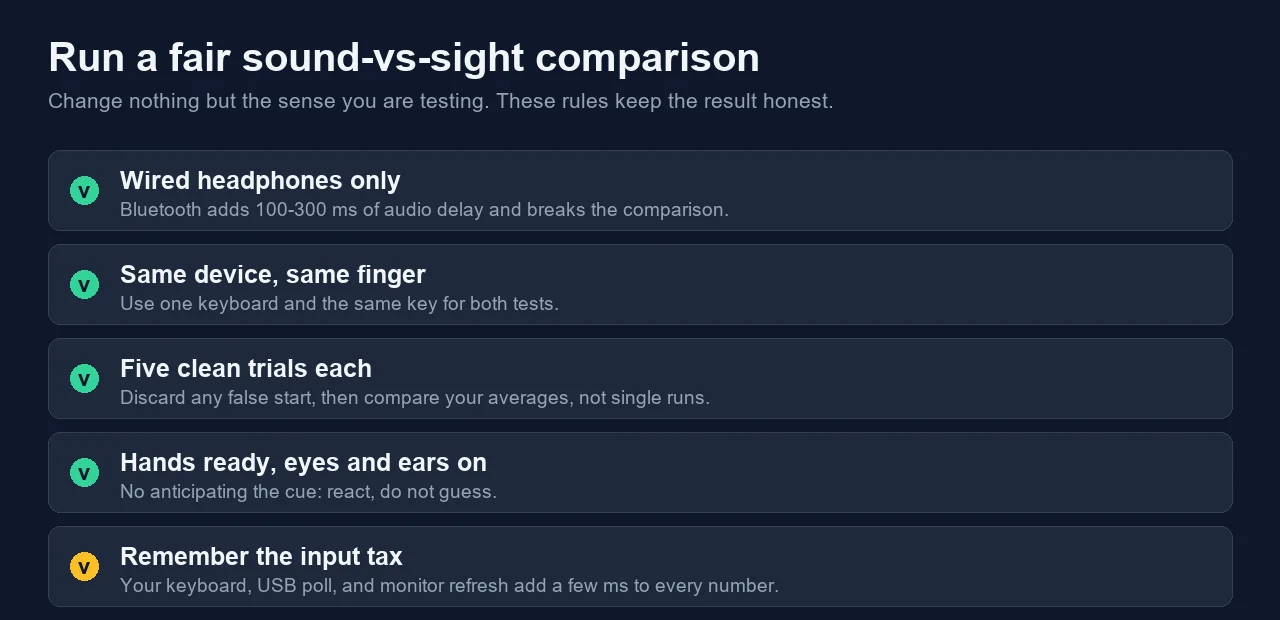
Keep everything identical except the sense you are testing. These rules remove the variables that quietly skew the result.
- Wired headphones only: Bluetooth adds 100-300 ms of audio delay and breaks the comparison.
- Same device and same finger: use one keyboard and the same key for both tests.
- Five clean trials each: discard false starts, then compare averages, not single runs.
- React, do not guess: clicking before the cue is anticipation and inflates your score.
- Remember the input tax: your keyboard, USB polling, and monitor refresh add a few ms to every number.
The Gaming Payoff: Footstep Audio vs Visual Peeks
This is why competitive FPS players obsess over sound. In games like Counter-Strike, Valorant, and Apex Legends, an audio footstep or reload cue can reach your decision a few tens of milliseconds before a visual peek would, and a multisensory study of elite badminton players found that adding sound measurably accelerated their visuomotor reaction speed. At the top level, where duels are decided in single frames, that head start is the difference between pre-aiming a corner and getting shot first.
It is also why pros invest in wired, low-latency audio and learn to separate footsteps by direction and distance. Sound gives an earlier, omnidirectional warning; sight gives precise aim. The best players use the ear to know where and the eye to confirm when.
Can You Actually Train Reaction Time?
Partly. The first 5-10 trials on any reaction test improve quickly as you learn the task, then the gains flatten — that early jump is learning, not a faster nervous system. Beyond that, the biggest movers are the boring ones: sleep, hydration, caffeine timing, and testing when you are alert (late morning to early afternoon for most people). Each of sleep loss, alcohol, fatigue, and time of day can shift your number by 10-30 ms.
What does not reliably move the core number is most "brain training" marketing. You can shave milliseconds by removing latency — a higher-refresh monitor, a wired low-latency keyboard or mouse, and wired audio — and by practicing the specific task. But the raw biological floor (around 100-120 ms for a genuine, non-anticipated reaction) is fixed. Anything faster on a test is anticipation, which the better tests flag as a false start.
Watch: How Human Reaction Time Works
This short FuseSchool physics explainer covers the stimulus-to-response chain that both tests measure. Watch it for the concept, then verify the sound-vs-sight gap with the two live tests above.
Sources and Research Notes
The numbers here come from a peer-reviewed reaction-time study, a multisensory sports-science paper, a large public reaction-time dataset, and audio-latency measurements from independent testing labs. Ranges labeled as practical guidance are exactly that, not lab constants.
- Shelton & Kumar (2010), Neuroscience & MedicineThe reaction-time study behind the 8-10 ms vs 20-40 ms transit and the 284 ms vs 331 ms means.
- Frontiers in Human Neuroscience (2021)Multisensory study showing auditory information accelerates the visuomotor reaction speed of elite badminton players.
- Human Benchmark reaction-time statisticsLarge public dataset behind the ~250-280 ms online visual reaction average.
- SoundGuys: understanding Bluetooth codecsWhy SBC and AAC add roughly 150-300 ms of wireless audio latency.
- RTINGS: Bluetooth connection and latency testsIndependent lab measurements of real headphone latency, including SBC near 283 ms.
- Backyard Brains: auditory motor reaction timeA reproducible classroom experiment that measures auditory reaction time directly.
Related Tools
Wait for the beep, then press. Measures sound response in milliseconds with false-start detection.
Visual Reaction Time TestClick when the color changes. The visual half of the experiment, in the same browser.
Input Latency CheckerSee how many milliseconds your keyboard, mouse, and connection add before the timer stops.
Related Guides
Hearing range vs response speed: if you cannot hear the cue tone, the sound test is invalid.
APM Test: Actions Per Minute TrackerAPM is sustained speed; reaction time is single-stimulus speed. Two different gamer metrics.
Input Latency Checker GuideThe exact milliseconds your input chain adds to every reaction number you measure.
Headphone & Speaker Left/Right TestVerify your audio output and channels work before you trust the sound trial.
FAQ
- Do reflexes slow down with age?Yes, gradually. Simple reaction time peaks in the early twenties and slows by roughly 1-2 ms per year after that, so a person in their fifties is typically tens of milliseconds slower than a teenager. Sleep, fitness, and removing input latency matter more day to day than age alone.
- Is touch faster than both sound and sight?Touch reaction time is usually the fastest of the three, around 150 ms, slightly ahead of sound and clearly ahead of sight. The ordering is touch, then sound, then sight, because each path differs in how many processing steps it crosses before the brain can act.
- Does monitor refresh rate affect visual reaction time?Yes. On a 60 Hz screen a new frame can appear up to about 16 ms late, while a 144 Hz screen cuts that to about 7 ms and 240 Hz to about 4 ms. That display delay is added to your measured visual reaction time, which is one reason gamers favor high-refresh monitors.
- Why are my reaction-time results so inconsistent?Single trials swing a lot, so always use the average of at least five clean runs. Inconsistency also comes from anticipating the cue, background distraction, fatigue, and variable audio latency on Bluetooth. Keep the device, finger, and conditions identical for repeatable numbers.
- Why is my reaction time different on phone vs PC?Touchscreens, wireless connections, and mobile browsers add their own latency, so phone results often look slower than a wired PC with a high-refresh monitor. Compare phone to phone and PC to PC; do not mix devices when you want a clean before-and-after.
Do not take the paper's word for it. Run five trials on the sound reaction test and five on the visual reaction test with wired headphones, then compare your two averages. In most cases sound wins, and now you have proof from your own device.

