Free screen size calculator. Enter aspect ratio + any one of diagonal, width, or height and the tool computes the other two in inches and centimeters. Ideal for monitor, TV, or laptop shopping.
Pick an aspect ratio, then enter a diagonal, width, or height. The tool resolves the other two dimensions in inches and centimeters.
Pick your aspect ratio, then type a diagonal OR width OR height. The other two fill in instantly, in both inches and centimeters. Area is also calculated so you can compare the visible surface of two TVs or monitors.
Diagonal
-
Width
-
Height
-
Visible area
-
Tip: TV manufacturers advertise the diagonal in inches, but what actually matters for viewing distance is the width. A 55" 16:9 TV is 48" wide — very different from a 55" 21:9 ultrawide.
Was this tool helpful?Rate Screen Size Calculator:5.0(2 ratings)Thanks for rating!
Screen Size Calculator is a free, browser-based screen testing tool that runs the full check instantly in your web browser.
Cost: Free, no signup
Install: None — runs in the browser
Privacy: Runs locally, no uploads
Platforms: Windows, macOS, Linux, Android, iOS
Time: Under a minute
Why You Need More Than the Diagonal
TV and monitor marketing leads with the diagonal — "55-inch TV", "27-inch gaming monitor" — because it's one memorable number. But the diagonal alone doesn't tell you whether the screen fits your space or compares meaningfully to another product. A 55-inch 16:9 TV is 48 inches wide and 27 inches tall. A 55-inch 21:9 ultrawide monitor is 51 inches wide and 22 inches tall. Same diagonal, very different real estate on your desk or wall.
How The Math Works
Every screen is a rectangle with a fixed aspect ratio (width:height). If you know the aspect ratio and any one of diagonal, width, or height, basic trigonometry solves the other two:
From width: height = width × (aspect_h / aspect_w), then diagonal = √(width² + height²)
From height: mirror of above
The calculator runs this live as you type and converts both ways between inches and centimeters.
Visible Area Is The Real Comparison
Two TVs with the same diagonal but different aspect ratios display different amounts of content. Visible area (width × height) is the best single number for "how much screen you actually get." A 27-inch 16:9 monitor has 311 square inches of screen. A 32-inch 16:9 monitor has 438 — about 40% more. A 34-inch 21:9 ultrawide has 424 — nearly the same area as the 32-inch flat panel but much wider and shorter.
Fitting A TV To A Space
Before ordering a new TV, measure the wall or cabinet width you have. Use this calculator to confirm the advertised diagonal fits. A "75-inch TV" is 65.4 inches wide (for 16:9) — it might not fit a 60-inch-wide media stand. Also factor in the TV bezel (usually +0.5 to +2 inches on each side) and any stand or wall-mount hardware.
A 55-inch 16:9 TV is 47.9 inches wide and 27.0 inches tall (121.7 cm x 68.6 cm). A 55-inch 21:9 ultrawide is 50.6 inches wide and 21.7 inches tall.
Is screen size measured diagonally?
Yes. All TV and monitor sizes advertised (e.g. 27-inch, 55-inch) are the length of the visible diagonal, measured corner to corner.
How do I convert screen diagonal to width?
Multiply diagonal by aspect_w / sqrt(aspect_w^2 + aspect_h^2). For 16:9 that factor is 16/sqrt(337) ≈ 0.8716. So 55 inch diagonal * 0.8716 = 47.94 inches wide.
What aspect ratio is my TV?
Almost all TVs since 2007 are 16:9. Recent ultrawide monitors are 21:9. Phones in portrait are typically 9:16 or 9:19.5.
01 / 10Monitor reality check1000Hz Is Real. Worth $999?LG's UltraGear 25G590B is the first native 1000Hz 1080p monitor. Check the fine print first.02 / 10The price$999.99 for 1080pThat is the LG.com launch price, confirmed Sept 10. A 24.5-inch IPS esports panel.03 / 10The 1 ms mathOne Frame Lasts 1 msAt 1000 Hz a frame is on screen for 1 ms—the same figure as LG's own 1 ms GtG response spec.04 / 10LG's own footnoteMBR Pro Turns Off VRRFreeSync Premium and G-SYNC Compatible are disabled while MBR Pro runs. The 1100Hz overclock drops FreeSync.05 / 10Feeding itCan Your PC Push 1000 fps?LG lists Windows 11, RTX 50 / RX 9070-class GPUs and DisplayPort 2.1. 1000 Hz does not promise 1000 fps.06 / 10Reality check1080p Is Still the Majority50.52% of Steam players ran 1080p in August 2026. LG is selling speed to the biggest resolution group.07 / 10Same moneyWhat $999 Buys InsteadA 480Hz QHD OLED tracked at $547.54 on Jul 30. LG's own 480Hz dual-mode 27G850A: about $699.99.08 / 10Verdict splitBuilt for One Kind of PlayerSerious FPS competitors with GPUs to match may justify it. Everyone else buys sharper pixels for less.09 / 10Delivery dayTest Before You TrustVerify the refresh rate your system actually reports, frame skipping, dead pixels and motion clarity.10 / 10Your turnCheck Your Refresh RateSee what your browser reports right now. A browser check reads reported rate, not certified panel speed.
01 / 10Phone buying guidePWM-sensitive? Test the phone, not the promiseDisplay specs narrow the shortlist, but no OLED is comfortable for everyone.02 / 10Build the shortlistStart with the display strategyCompare LCD, DC-dimming and high-frequency PWM options. Each still needs a real-use check.03 / 10Read the evidenceSpecifications are only a filterFrequency, modulation, brightness and firmware can all change how a screen behaves.04 / 10Before testingEnable the documented display settingToggle names and effects vary by model. Confirm the current manual before testing.05 / 10First passTest at your normal brightness firstUse the reading, video and scrolling tasks you actually do each day.06 / 10Low-light passRepeat at a lower brightnessOLED dimming behavior may change as brightness falls. Keep the same room and screen content.07 / 10Store checkCompare camera bands, not just one photoUse the same camera, exposure and distance on each phone for a fair comparison.08 / 10Read cautiouslyBanding is a clue, not a lab resultCamera bands can reveal pulsing, but not exact PWM, modulation or medical conclusions.09 / 10Final decisionLet the return window settle the choiceTry normal use briefly. Stop if discomfort occurs; return it before the seller's deadline.10 / 10One last checkRun one controlled flicker comparisonUse the same brightness and camera setup, then save the result with your buying notes.
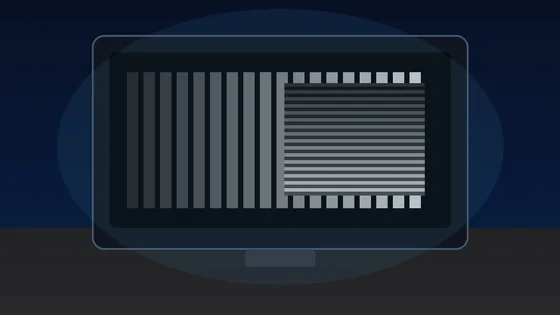
01 / 10Screen flicker testYour screen may be flickeringMany displays dim by switching the backlight on and off hundreds of times a second.02 / 10The symptomSore eyes and evening headachesStrain that gets worse at night, on one device but not another, is the clue.03 / 10What PWM meansDimming by blinking, not fadingInstead of lowering brightness, the backlight pulses. Faster pulsing is easier to tolerate.04 / 10Why night is worseLower brightness, deeper flickerThe dimmer you set the screen, the longer the backlight stays off between pulses.05 / 10Run the testWatch the moving patternA flickering backlight breaks the motion into separate copies instead of a smooth trail.06 / 10What to look forBands mean pulsingClear repeated edges suggest PWM. A smooth blur suggests steady, flicker-free dimming.07 / 10Not everyoneSome people never noticeSensitivity varies widely. Migraine and dry eyes can make the same screen unbearable.08 / 10What helpsRaise brightness, lower contrastHigher brightness usually shortens the off phase. Warm light and screen breaks help too.09 / 10One honest limitA browser cannot measure hertzThis shows whether flicker is visible to you, not the exact PWM frequency.10 / 10Your turnSee how your screen dimsRun the pattern at full and low brightness, then compare your devices.
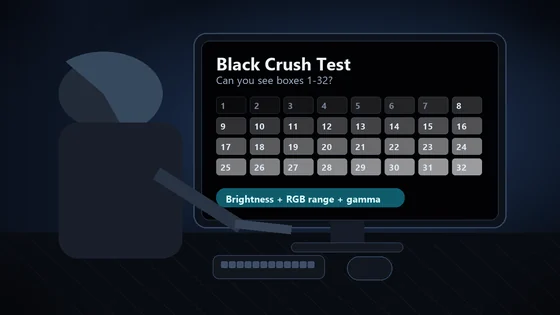
01 / 10Monitor checkDark scenes losing detail?Your monitor may be turning several near-black shades into one flat black.02 / 10The symptomShadow texture disappearsHair, clothing, caves and night scenes merge into featureless black. That is black crush.03 / 10Before you testUse normal SDR settingsDim the room, avoid glare and let your eyes adapt for 30 to 60 seconds.04 / 10The testLook for 32 near-black stepsPatch 1 is darkest. Patch 32 is easiest. Use fullscreen and do not expect the low steps to glow.05 / 10Read the resultFind the first visible patchIt should be barely separate from the black background. Note its number.06 / 10ExcellentYou can see 1 through 32Your display is preserving very dark shadow steps. Subtle is correct.07 / 10Mild crushingVisibility starts near 4Brightness may be too low, or gamma may be hiding the first few steps.08 / 10Moderate to severeVisibility starts at 8 or 16Check the monitor black-level setting and whether the GPU is sending Full or Limited RGB.09 / 10Fix one variable at a timeBrightness. Range. Gamma.Retest after each change. Establish a clean SDR result before troubleshooting HDR.10 / 10See what your display keepsRun all 32 shadow stepsThe live tool is the proper diagnostic surface; compressed story images are only a guide.