






Fast answer
Yes, a mostly static PHP site on shared hosting can stay useful during a planned origin outage without moving the live account. We put a Cloudflare Worker in front of KeyboardTester.click: healthy requests pass through unchanged, while network failures and selected server errors receive a prebuilt static snapshot. Recovery is automatic on the next healthy request. This is a practical continuity pattern, not universal zero-downtime hosting: forms, email, AI features and saved actions still depend on the origin.
A hosting notice gave us a six-hour maintenance window and no exact outage duration. Waiting for a “server down” email would leave a manual gap; switching DNS to a single maintenance page would preserve a message, but not the site people came to use. We wanted the public tools and guides to remain readable, search crawlers to receive sensible responses, and normal service to return without someone staying awake to flip a switch.
This case study documents the design we actually deployed for KeyboardTester.click. It covers the hosting conversation, the Worker decision logic, the snapshot build, the same-zone routing trap, Free-plan safeguards, status-code behavior, ads and analytics, and the boundaries we chose not to hide.
Timing note: as of July 18, 2026, the scheduled maintenance has not yet occurred. The results in this article come from forced-origin-failure tests, authenticated staging, exhaustive snapshot checks and healthy live pass-through—not from the real maintenance window.
What the HostArmada ticket clarified
The maintenance notice covered July 22, 2026, from 10:00 a.m. to 4:00 p.m. CDT. We asked HostArmada whether that meant six continuous hours offline, whether a temporary account migration was possible, what services would be affected, whether an off-server 503 Service Unavailable endpoint could cover every URL, what rollback existed, and how any service credit would be assessed.
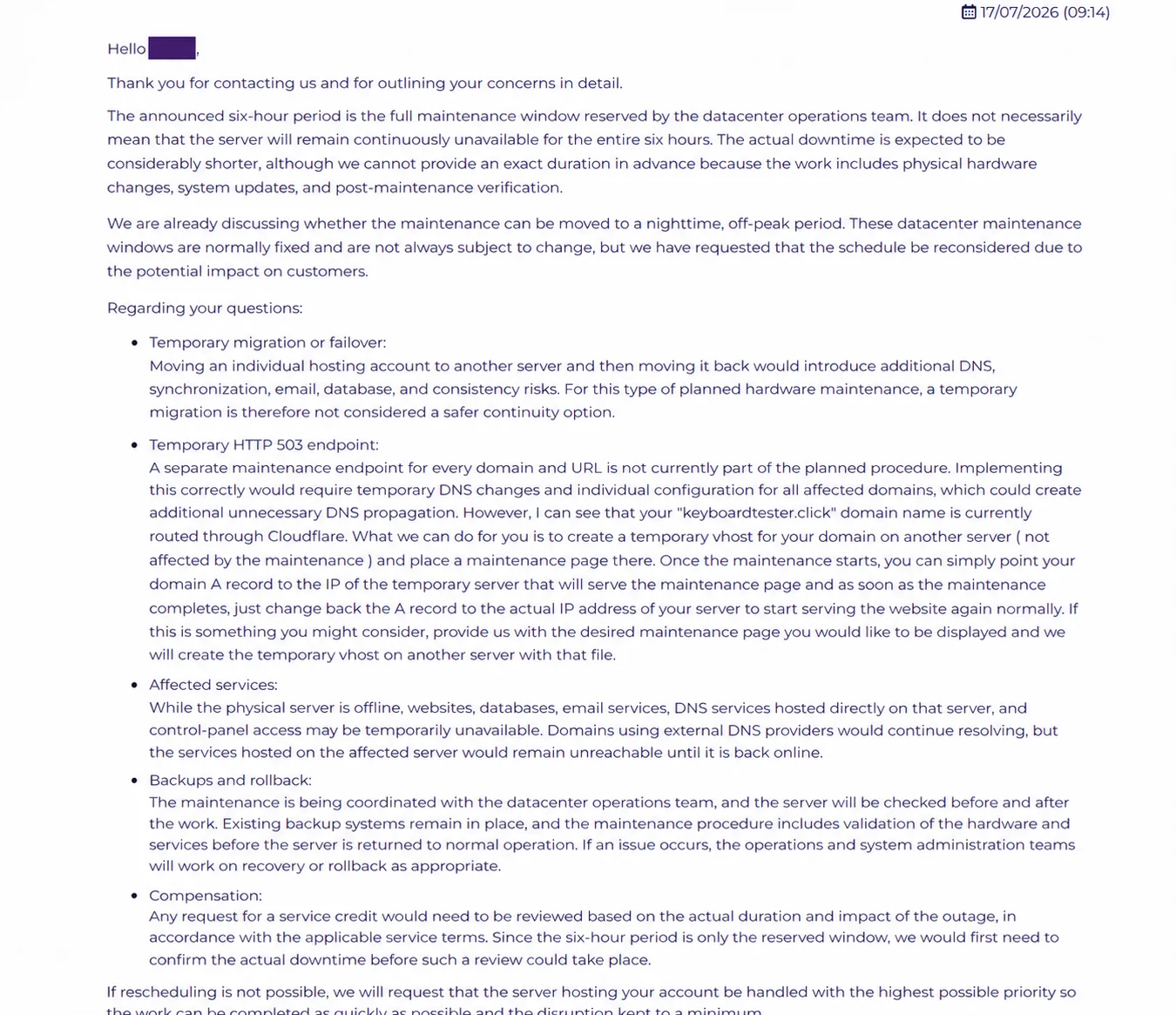
After escalation, the system administration response clarified that six hours was the reserved window, not a promise of six continuous hours of downtime. The actual interruption was expected to be shorter, but could not be predicted because the work included physical hardware changes, system updates and verification. A temporary account move was rejected as the safer option because moving back and forth could create DNS, synchronization, email and database consistency risks.
The provider offered a reasonable maintenance-page option: an unaffected server could host a temporary virtual host, then we could manually change the A record at the start and change it back after completion. External DNS would continue resolving, but web, database, email and control-panel services on the affected machine would be unreachable. Backups and recovery procedures were in place; service credit would be reviewed only after the real impact was known.
That offer was fair for a maintenance notice. It was still manual and did not provide functional-site continuity, so we used it as the baseline to improve rather than portraying it as a provider failure.
Evidence timeline: from maintenance email to tested continuity layer
This chronology separates what the provider announced, what we asked, what was actually built, and what has only been tested so far. That distinction matters because the maintenance event is still in the future as of this article’s publication.
- July 2026 — maintenance email received
The Start Dock shared-hosting notice reserved July 22, 10:00 a.m.–4:00 p.m. CDT. It listed CPU, RAM and SSD hardware upgrades; web-server security and software updates; a kernel update; temporary-file, cache and log cleanup; and general optimization. It also warned that the procedure could not be reversed once started.
- July 16 — continuity questions escalated
We asked whether six hours meant continuous downtime, requested an actual estimate, explored account migration or an off-server 503 endpoint, confirmed affected web/database/email services, and asked about backup, rollback and service credit.
- July 17 — HostArmada administration replied
The provider said six hours was the reserved window, expected a shorter but unknown interruption, rejected a temporary account move because of synchronization risk, and offered an unaffected-server vhost plus manual A-record changes.
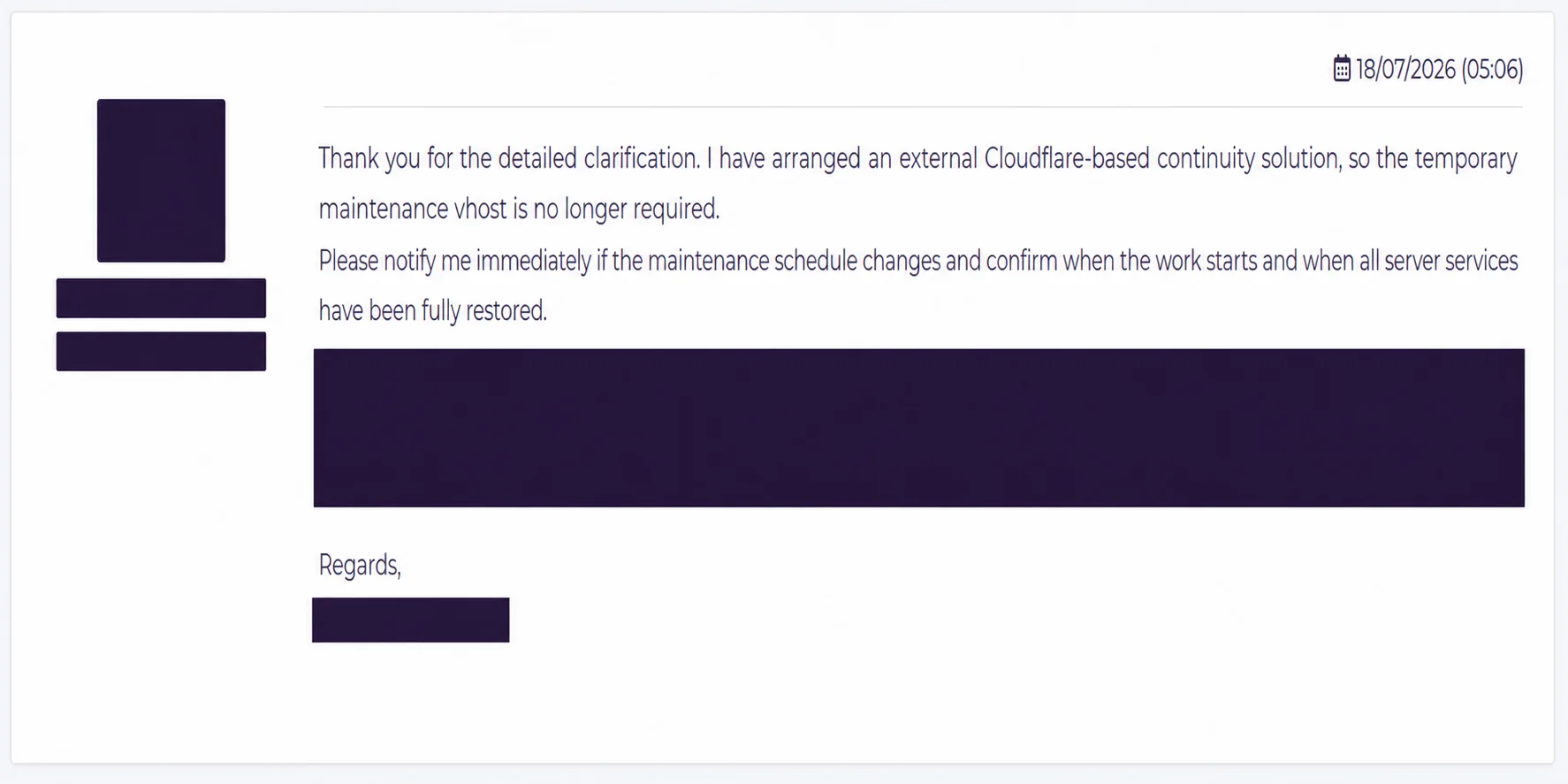
- July 17 design selected; July 18 follow-up sent
We chose an always-on origin-first Worker with a static snapshot instead of a public duplicate URL or timed DNS cutover. Private staging, route collision checks, explicit 503 behavior and rollback were required gates.
- July 17–18 — controlled implementation and tests
We captured 1,514 pages and 1,234 first-party assets, deployed private staging, audited 2,748 public page/asset paths, tested forced failure and healthy pass-through, fixed same-zone recursion, enabled fail-open routes, and verified apex plus www.
- July 18 — prepared, not yet proven by the event
The continuity layer is live and tested, but the scheduled July 22 maintenance has not occurred. Any claim about real event duration, real fallback traffic or event-day ad revenue must wait for post-event evidence.
The architecture: origin first, snapshot only when needed
The Worker is always on the public apex and www routes. For each request it first asks the real HostArmada origin, with a bounded timeout. A healthy response passes through byte for byte, so ordinary PHP behavior, sessions, caching headers, ads and analytics remain exactly as the origin produced them.
If the origin cannot be reached, times out, or returns one of the selected infrastructure failure statuses—500, 502, 503, 504 or Cloudflare 520 through 527—the Worker looks up the same path in its static asset snapshot. GET and HEAD requests can therefore continue as static pages and assets. The next request checks the origin again, so a healthy server automatically takes over without DNS edits or a recovery switch.
The copy is deliberately a snapshot, not a second PHP stack. That made the failover deterministic and avoided split databases, duplicated email delivery, session conflicts and data reconciliation after the window.
Request flow at a glance

Provider maintenance page versus Worker continuity
Both approaches have a place. The choice depends on whether you only need correct maintenance semantics or need most read-only site journeys to continue.
| Question | Temporary provider vhost | Always-on Worker continuity |
|---|---|---|
| Cutover | Manual DNS change at the start and end | Automatic per request |
| What visitors see | One maintenance page | Matching static page, tool or asset when available |
| Dynamic writes | Unavailable | Unavailable; explicit 503 with Retry-After |
| Recovery | Manual DNS restoration | Automatic on the next healthy origin response |
| Data consistency risk | No temporary app database, so low | No second app database, so low |
| Operational complexity | Simple page, but timed human action | More preparation and testing; little action during the event |
What users and crawlers receive during failure
Public pages, client-side tools, styles, scripts, images and fonts continue from the snapshot on safe read methods. A small fallback notice makes the degraded state honest without replacing the content. Existing canonicals and structured data stay on the original same-domain URLs.
We did not pretend that state-changing actions worked. POST requests and unknown unavailable actions return 503 Service Unavailable, Retry-After: 300 and Cache-Control: no-store. RFC 9110 specifically defines 503 for temporary overload or scheduled maintenance and allows Retry-After to tell clients when to try again.
This distinction matters: returning a pretty 200 OK “maintenance” page for a failed form can mislead users and crawlers. Returning a controlled 503 for the unavailable action is both more honest and easier for clients to retry.
Actual fallback decision matrix
| Origin result | GET / HEAD | POST or other write |
|---|---|---|
| Healthy response, redirect, 4xx, or any status outside the fallback set | Pass the origin response through unchanged | Pass the origin response through unchanged |
| Network failure or 4.5-second timeout | Serve the matching snapshot path; 503 if no snapshot exists | 503 + Retry-After: 300 + no-store |
| 500, 502, 503, 504, or Cloudflare 520–527 | Serve the matching snapshot path; preserve the origin status in a diagnostic header | 503 + Retry-After: 300 + no-store |
| Unknown safe path while origin is unavailable | Controlled 503; never invent a page or return the homepage as 200 | Not applicable |
How we built and verified the snapshot
We crawled the rendered live canonical site rather than copying the local PHP tree, because the local workspace contained unpublished changes. The final inventory captured 1,514 rendered pages and 1,234 referenced first-party assets. With manifests and support files, the deployment contained 2,749 files totaling about 547.6 MB. Every file remained under Cloudflare’s per-asset limit.
The crawler kept canonical and schema markup, repaired a small set of legacy relative asset references inside the fallback copy, removed production trackers during snapshot creation, and inserted a restrained continuity notice. Production-only GA4, AdSense and homepage Clarity are added later by the Worker, while private staging stays tracker-free and noindex.
Validation was layered: TypeScript and unit checks, local forced-origin-failure tests, authenticated staging checks, representative browser checks, origin-preview checks, and an exhaustive remote audit. The exhaustive pass returned every one of the 2,748 public page-and-asset paths successfully. We also confirmed that healthy live requests carried no fallback header before activating both routes.

Reproduce the setup safely: implementation steps and sanitized code
1. Define the contract before coding. Decide which hostnames are covered, which HTTP methods are safe, what status codes trigger fallback, how long an origin request may wait, how unknown paths behave, and exactly how routes are removed. Do not treat “any non-200” as an outage: redirects, 404s and authorization responses can be legitimate origin behavior.
2. Crawl rendered production. The builder should start from the canonical sitemap and discover only same-origin resources referenced by rendered HTML and CSS. Normalize URLs, strip fragments, keep query-sensitive assets where needed, reject unsafe filesystem traversal, and fail the build if file-count or per-file limits are exceeded.
3. Preserve meaning while removing runtime dependencies. Keep canonicals, hreflang, schema, internal links and client-side tool assets. Remove service-worker registration and tracking from the stored copy. Add only a restrained continuity notice. Inject ads and analytics later in production mode so private staging stays clean.
4. Bind static assets to the Worker. Use an ASSETS binding and run the Worker first, because the script must try the origin before deciding whether the matching static file is needed. The configuration below uses placeholders; never copy private account identifiers or an origin address into a public article.
5. Avoid same-zone recursion. Create or reuse a controlled DNS-only hostname in the same Cloudflare zone that resolves to the origin. Use it only for resolveOverride; keep the requested URL and Host header canonical. Verify direct-origin TLS and virtual-host behavior before attaching a public route.
6. Deploy private staging first. Protect it with a secret, emit X-Robots-Tag: noindex, nofollow, noarchive, return a blocking robots.txt, disable ads and analytics, and support an explicit origin-preview mode for comparison.
7. Attach routes one at a time. List all existing routes and refuse collisions. Attach the apex route, confirm healthy pass-through, then attach www and confirm its canonical redirect. Store no production route pattern in the ordinary deploy config if an accidental redeploy could change routing.
8. Keep route rollback independent of Worker deployment. Removing the two owned routes should immediately return traffic to the hosting origin without deleting the Worker or snapshot. Revoke temporary route-edit credentials after the event.
Sanitized Worker/static-assets configuration
{
  "name": "example-host-outage-fallback",
  "main": "src/index.ts",
  "compatibility_date": "2026-07-17",
  "assets": {
    "directory": "./snapshot/dist",
    "binding": "ASSETS",
    "run_worker_first": true,
    "html_handling": "none",
    "not_found_handling": "none"
  },
  "vars": {
    "MODE": "production",
    "ORIGIN_BASE": "https://example.com",
    "ORIGIN_RESOLVE_OVERRIDE": "origin-bypass.example.com",
    "ORIGIN_TIMEOUT_MS": "4500"
  }
}
Origin-first decision and fallback status matrix
const FALLBACK_STATUSES = new Set([
  500, 502, 503, 504, 520, 521, 522, 523, 524, 525, 526, 527
]);

try {
  const origin = await fetch(originRequest, {
    signal: AbortSignal.timeout(4500),
    redirect: "manual",
    cf: { resolveOverride: "origin-bypass.example.com" }
  });
  if (!FALLBACK_STATUSES.has(origin.status)) return origin;
  return serveSnapshot(request, origin.status);
} catch {
  return serveSnapshot(request);
}
Return an honest 503 for writes
if (!new Set(["GET", "HEAD"]).has(request.method)) {
  return new Response("Temporarily unavailable", {
    status: 503,
    headers: {
      "Retry-After": "300",
      "Cache-Control": "no-store",
      "Content-Type": "text/plain; charset=utf-8"
    }
  });
}
Build, stage, verify, activate and roll back
# Build from rendered production and validate the package
python scripts/build_snapshot.py
npm run types
npm run check
npx wrangler deploy --env staging --dry-run

# Deploy and test the private preview (use your own secret securely)
npx wrangler deploy --env staging
python scripts/smoke_staging.py --base "https://<private-preview>" --password "<secret>"

# Inspect, activate, or remove only the owned routes
python scripts/manage_routes.py status
python scripts/manage_routes.py activate --confirm ACTIVATE-KBT-FALLBACK
python scripts/manage_routes.py deactivate --confirm REMOVE-KBT-FALLBACK
Test plan: prove failure, pass-through and recovery
A polished homepage is not enough. Test a representative matrix: homepage, primary browser tool, CSS and JavaScript assets, one article, Arabic RTL, a long localized page, robots.txt, a missing path, a HEAD request, a form POST, the www redirect and both light and dark themes on mobile.
Run three distinct states. In snapshot mode, verify the fallback header, same canonical URL, one H1, valid JSON-LD, assets and maintenance notice. In origin preview, verify the bypass reaches the real host without recursion. In healthy production pass-through, verify the fallback header is absent and the origin response, redirect and tracking behavior are unchanged.
Do not break the production origin to test. Use a private preview or separately controlled failing origin. Record the snapshot generation time and a manifest hash so you know exactly which copy was tested.
Rollback, event-day monitoring and recovery
The immediate rollback is route removal, not DNS surgery and not Worker deletion. Remove only the routes owned by the continuity Worker, verify apex and www directly, and purge cache only if stale fallback HTML remains. Leave the Worker deployed until the origin has been stable long enough to investigate safely.
During the maintenance window, watch Worker fallback headers, origin status, error logs, key page checks and unavailable-action 503s. Automatic recovery means users do not wait for a manual “maintenance off” action: as soon as the origin answers healthily, its response passes through. After the event, verify stability, remove temporary edit permissions, archive the measurements and rebuild the snapshot before the next major event.
Two traps: same-zone recursion and the Free-plan request ceiling
The most dangerous implementation detail was origin recursion. Once a Worker route covers keyboardtester.click/*, fetching that same public hostname naively can send the request back through the Worker. We used Cloudflare’s documented resolveOverride behavior with an existing DNS-only hostname in the same zone. The lookup goes directly to the shared-hosting origin while the request URL and Host header remain canonical. Never publish the origin address or make a new bypass hostname casually; treat it as infrastructure.
Cloudflare’s Free plan currently allows 100,000 Worker requests per day, 20,000 static asset files per Worker version and 25 MiB per individual static asset. Our 2,749-file package fits those asset limits. We configured both public routes with request-limit fail-open. If the daily Worker allowance is exhausted, Cloudflare bypasses the Worker and requests go directly to HostArmada rather than failing with an Error 1027 page. That is the right trade-off here because the Worker provides availability, not security enforcement.
SEO, ads and analytics during fallback
The fallback serves the original URLs with their existing canonical tags, structured data and internal links. Read-only pages return 200 because the requested content is genuinely available; unavailable state-changing actions return 503. A single short outage should not require a special canonical domain or a duplicate public backup URL.
Private staging is password-protected, blocked by robots.txt, marked noindex, nofollow, noarchive and stripped of advertising and analytics. Production fallback HTML receives the site’s existing GA4 and AdSense integrations; Clarity is limited to the homepage. They load after interaction or a delay, and only on snapshot HTML. Healthy origin responses are untouched. This preserves outage measurement and possible ad delivery, although ad fill and revenue are never guaranteed.
We did not submit fallback URLs to search engines because there are no new public URLs. The continuity layer sits behind the same addresses Google already knows.
The production-only injection matches the live performance posture: GA4 loads after an early interaction or two seconds after load; AdSense after interaction or 15 seconds; homepage Clarity after interaction or 12 seconds. A streaming HTMLRewriter appends the integration only to fallback GET HTML. HEAD, CSS, JavaScript, images and other non-HTML responses are never modified.
The same measurement discipline appears in our AdSense-to-Journey case study: independent GA4 traffic stays separate from ad-network reporting while the migration settles.
What this pattern cannot do—and when to use something else
During an origin outage, forms, server-side AI, email, database writes, account sessions, saved submissions and control-panel functions remain unavailable. A browser-only tool may keep working if every required script and asset is in the snapshot; anything that calls the PHP server or an unavailable backend will not.
The snapshot can also become stale. Refresh it after meaningful content, design or asset changes, and test restoration—not only failure. If your product is write-heavy, authenticated or transaction-critical, use a replicated application architecture with tested data failover instead of this static continuity pattern.
For a content-heavy shared-hosting site with many client-side tools, however, this was a good fit: no database split, no manual cutover, no duplicate public domain and a clear degraded mode. It reduces the visible outage bracket; it does not abolish every dependency.
Authoritative sources and first-hand evidence
The implementation measurements come from our generated manifests, deployment checks and live route verification on July 17–18, 2026. Product behavior and limits below are linked to primary documentation.
- Cloudflare Workers: Static Assets
How a Worker deploys and serves HTML, CSS, JavaScript and images through the ASSETS binding.
- Cloudflare Workers: Platform Limits
Current Free-plan request, file-count and per-file limits, plus fail-open versus fail-closed behavior.
- Cloudflare Workers Request API
Official behavior of resolveOverride, including same-zone requirements and preservation of the URL Host header.
- Cloudflare Workers Routes API
The official API surface for listing, creating, updating and deleting zone routes.
- RFC 9110: HTTP Semantics
The standard definition of 503 Service Unavailable and Retry-After for temporary outages and scheduled maintenance.
- HostArmada support correspondence, July 16–17, 2026
Anonymized first-hand ticket exchange used to confirm the maintenance window, affected services, temporary-vhost option and operational constraints.
Frequently asked questions
- Does this make shared hosting truly zero-downtime?
No. It keeps a prepared read-only copy available when the origin fails. Database writes, forms, server-side AI, email and account-backed actions still depend on the hosting server.
- Do I have to switch DNS when the host goes down?
Not with this always-on Worker pattern. The Worker checks the origin on each request and serves the matching snapshot only when the origin fails. It automatically resumes origin responses after recovery.
- Will Google see a maintenance page for every URL?
No. Snapshot pages that genuinely exist remain available at their original URLs with 200 responses, canonical tags and structured data. Unavailable write actions return a temporary 503 with Retry-After.
- Why not temporarily migrate the complete hosting account?
A short move and move-back can introduce DNS, database, email and file synchronization risks. For this maintenance event, both the provider and our design favored avoiding a second writable application stack.
- Why use resolveOverride?
A Worker routed on the public hostname must avoid fetching itself recursively. resolveOverride lets the origin lookup use an alternate same-zone DNS hostname while preserving the canonical URL and Host header.
- What happens if the Workers Free daily limit is reached?
The routes are configured fail-open. Cloudflare then bypasses the Worker and sends requests directly to the hosting origin. During an origin outage that removes the fallback benefit, but it avoids a Worker quota error becoming a new outage.
- How often should the fallback snapshot be updated?
Refresh it after major content, template, script or asset changes, and before a planned maintenance event. Validate representative pages, all critical assets, forced failure and automatic recovery each time.
The useful lesson is not “put everything behind a Worker.” It is to choose the smallest continuity layer that matches your failure mode, test it privately, expose limitations honestly, and make recovery automatic.



Reader discussion
Comments
Share what worked, what did not, or what you would test next. Every comment is reviewed before it appears.
Loading approved comments…
Leave a comment
No account or sign-in is required. Links and HTML are not accepted.