







Fast answer
The sudden GA4 traffic was not a surge of 319 simultaneous people. The card covered a rolling 30-minute window, and GA4, Cloudflare, and origin logs together pointed to distributed abusive browser automation or scraping-like traffic. We used a narrow Cloudflare Managed Challenge that preserved normal users, site assets, APIs, and verified crawlers. No evidence of compromise was found.
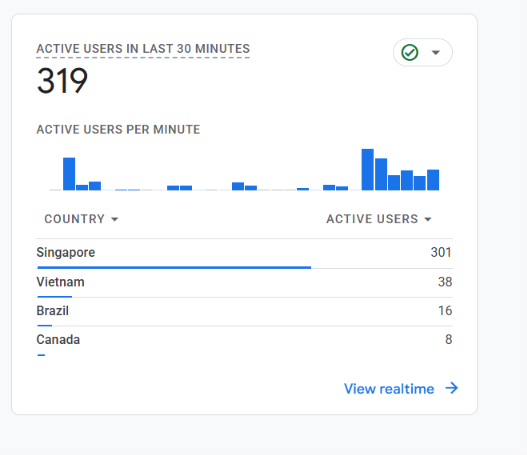
The alert looked dramatic: Google Analytics showed 319 active users in the last 30 minutes, while the country table separately displayed Singapore: 301. Those tiles can refresh on slightly different schedules, so we did not divide one number by the other or describe them as simultaneous connections.
This case study follows the complete incident: how we separated humans from automation, checked whether the traffic came from Google or AI crawlers, measured real hosting transfer, assessed SEO and AdSense risk, chose a low-impact fix, and verified that legitimate traffic still worked.
The conclusion is deliberately narrow. The evidence supports distributed browser automation using rotating IPs. It does not identify the operator, physical origin, or motive, and it does not prove a DDoS campaign, hacking, data theft, or an AI-crawler operation.
The alert: what “319 active users” actually meant
GA4 Realtime reports activity during the previous 30 minutes; it is not a socket counter and does not mean every listed user is connected at the same instant. Google documents the card as “active users in last 30 minutes.” That distinction also explains why traffic can remain visible for a while after edge mitigation.
A country row alone cannot prove either real demand or abuse. Legitimate visitors, VPN exits, proxy networks, cloud infrastructure, and automated browsers can all appear under the same country. We therefore treated Singapore as an analytics observation, not as an identity or a reason for a country-wide block.
The original screenshot was our starting signal, not the verdict. We preserved it, noted the measurement window, then looked for independent evidence at the CDN and hosting origin.
How we identified bot traffic without trusting GA4 alone
GA4 supplied behavior clues. The Singapore aggregate had zero engaged sessions, close to one page per session, mostly direct/blank attribution, a concentrated desktop-browser profile, and a broad sweep across landing pages. A real publicity spike normally leaves at least some coherent referrals, engagement, conversions, or repeated content interest.
Cloudflare supplied request evidence. One hour included a sharp three-minute cluster totaling 5,675 requests. The wider sample showed explicit headless-browser traffic plus repeated stock-browser signatures. Those clients requested public pages and browser assets in patterns consistent with automation, not one popular article spreading socially.
The origin log proved that some of the traffic reached the host. In one nine-minute window, the origin recorded 3,869 requests from 1,101 IPs. Rotating addresses made IP-by-IP blocking impractical. A separate impact window recorded 2,126 origin requests and 63,296,919 response-body bytes in roughly 32 minutes.
No one clue is decisive on its own. The useful method is triangulation: compare analytics behavior, edge request patterns, and origin logs for the same time period. If GA4 spikes but the CDN and server see nothing, investigate Measurement Protocol spam, hostname problems, or tagging mistakes before changing the firewall.
The three-layer evidence chain
| Layer | Observation | Safe conclusion |
|---|---|---|
| GA4 behavior | Zero engagement in the analyzed Singapore aggregate, direct/blank attribution, broad page sweep | Strong automation signal; not sufficient alone |
| Cloudflare edge | Clustered minutes, headless and repeated browser signatures, broad page/asset retrieval | Requests hit the website edge |
| Origin logs | Rotating IPs and real page/asset requests with response bytes | Some load and transfer reached hosting |
| Known crawlers | Google, Bing, OpenAI, Meta, and ad-verification agents appeared separately in small volumes | Not the driver of the visible burst |
| Security paths | No exploit, login, admin, brute-force, or exposed-file pattern in the inspected sample | No evidence of compromise found |
Was it Google, an AI crawler, a scraper, or an attack?
Recognized Google, Bing, OpenAI, Meta, and advertising-verification crawlers appeared separately in small volumes with their own identifiable agents. They were not the population driving the spike. A browser-looking user agent is not proof of a human, and a crawler name in a user agent is not proof of crawler identity; legitimate search crawlers should be verified and explicitly protected.
The safest description is distributed abusive browser automation or scraping-like traffic using rotating IPs. Some headless clients behaved like full browsers, loading pages, CSS, JavaScript, PWA files, and broad image inventories. Other clients made one public-page request per rotating address with no referrer.
We found no burst of login attempts, admin probing, exposed-file requests, brute force, or exploit paths in the inspected sample. The suspicious origin requests we inspected used GET/HEAD against public content, with no POST burst. Therefore: no evidence of compromise was found, but the operator and motive remain unknown.
What could happen if we did nothing: bandwidth, ranking, and AdSense
It consumed real bandwidth and compute work. A 35-minute Cloudflare sample recorded 10,038 requests and 166,891,967 edge response bytes. Caching absorbed part of the load, but the origin sample confirms that requests and response bodies also reached shared hosting.
At the observed sustained rate, the abnormal signatures alone would have added about 1.4 GB per day if the rate had continued. That was a conditional projection, not the amount ultimately used or a hosting bill. To model another incident, use our Bandwidth Calculator to estimate sustained transfer can translate a request size and rate into estimated transfer; it cannot identify bots.
A GA4 spike does not automatically lower rankings. The direct ranking risk was low while the public site remained healthy. The indirect risk becomes real if repeated automation causes latency, resource throttling, or genuine 5xx responses that affect visitors and Google crawling—or if an over-broad firewall rule blocks verified crawlers.
Analytics and ad quality can still suffer. Automated page loads distort audience, source, and content reports. Google AdSense treats automated and bot traffic as a possible source of invalid traffic, so publishers should watch the Policy Center, unusual ad metrics, and accidental clicks rather than assuming all page views are monetizable.
Could the wave have ended by itself? Yes. Automated inventory crawls often stop when a list is exhausted, and earlier waves had ended. But a recurring pattern makes “wait and hope” a weak permanent defense: the next burst can arrive with a new IP pool or browser signature.
To see why independent GA4 traffic should stay separate from ad-network reporting during a migration, read our real AdSense-to-Journey earnings comparison.
The low-impact fix: a narrowly scoped Managed Challenge
We did not block Singapore. The request pool was distributed, country attribution was not identity, and a geographic block would reject legitimate visitors while motivated automation could simply change exit regions.
We also avoided an immediate hard block. Cloudflare Managed Challenge lets the edge decide whether a request should receive a lightweight verification step. A client that passes can continue; traffic that cannot complete the challenge does not reach the origin in the same way. This is reversible and provides a safer first response when the evidence is strong but not perfect.
The production rule was limited to the suspicious public-page navigation behavior observed in the incident. It excluded Cloudflare-verified bots, non-GET traffic, APIs, static assets, PWA/service-worker paths, and Cloudflare internal paths. We are intentionally not publishing the live expression, exact fingerprints, rule IDs, account data, or origin details because that would create an evasion guide and age badly.
Managed Challenge has possible downsides. A legitimate user may see a short verification step, privacy or script-blocking settings can make it harder to pass, and an incorrectly scoped challenge can break APIs, AJAX, webhooks, service workers, embeds, or search crawling. Those are reasons to begin narrow, test every required path, monitor false positives, and keep a rollback—not reasons to ignore a measured abusive burst.
A separate resilience problem needs a separate design. Our Cloudflare Workers shared-hosting failover case study protects read-only access during an origin outage; it does not classify bot traffic. WAF mitigation and outage continuity should not be treated as one interchangeable feature.

Results: edge challenges rose while origin traffic fell
After activation, Cloudflare recorded 128 challenged requests. That count does not mean 128 unique bots, people, or attackers; one client can generate multiple challenge responses.
Post-rule origin snapshots dropped to 8 requests in one minute and 17 in the next. No newly watched page-fetch signature reached the origin after final tightening. A matching suspicious HTML probe received HTTP 403 with Cloudflare’s challenge marker, while normal probes continued to return HTTP 200.
Regression checks covered normal desktop and mobile navigation, a localized Japanese tool, the manifest, service worker, a public embed with an external referrer, Googlebot, and OAI-SearchBot. Those controls stayed available. That verification mattered more than watching one analytics number fall.
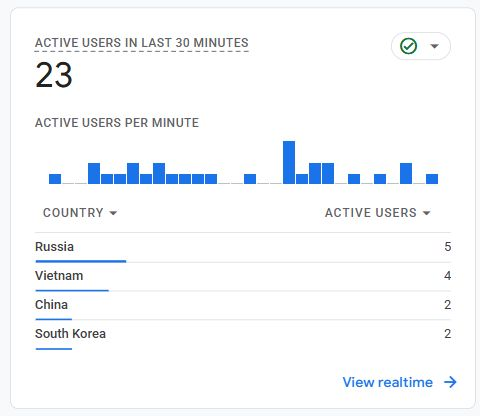
During the immediate verification period, GA4’s rolling card moved from the original 319 total / Singapore row 301 to a later 241 total / Singapore row 224. A later July 31 context check showed 23 active users. The decline is consistent with mitigation and sessions aging out of the 30-minute window, but the later screenshot is not proof that one rule caused every change.
What remained accessible after the rule
| Control | Observed result | Why it mattered |
|---|---|---|
| Normal desktop and mobile pages | 200 | Ordinary visits remained available |
| Localized Japanese tool | 200 | The rule was not English-only or path-blind |
| Manifest, service worker, public embed | 200 | PWA assets and embedded use were preserved |
| Googlebot and OAI-SearchBot probes | 200 | Verified crawler paths remained reachable |
| Matching suspicious HTML probe | 403 + challenge marker | The edge intercepted the watched pattern |
A safe playbook for your own sudden GA4 spike
1. Preserve the time window. Save a screenshot and record the timezone, minute pattern, countries, source/medium, landing pages, engagement, device, and browser breakdown. Do not call the Realtime total simultaneous connections.
2. Corroborate outside GA4. Compare CDN requests, security events, cache status, response bytes, status codes, and origin access logs. If you cannot access logs, ask the host for a narrow timestamped sample rather than a full data dump.
3. Classify behavior, not nationality. Separate verified search/AI crawlers, monitoring, ad-verification bots, ordinary browsers, scraping-like navigation, endpoint abuse, and exploit attempts. Different classes need different controls.
4. Start with the smallest reversible control. For clear suspicious page navigation, simulate or preview a narrow rule, use Managed Challenge before hard block, exclude verified bots and required application paths, and keep the exact production fingerprint private.
5. Test controls and failure cases. Check desktop, mobile, key locales, login/forms if applicable, APIs, static files, service workers, embeds, verified crawlers, and the suspicious pattern. Confirm both edge action and origin reduction.
6. Monitor and adjust. Watch false positives, challenge solve rates, origin load, 5xx, GSC crawl health, GA4 quality, and AdSense notices. Tighten only when new evidence supports it; roll back quickly if legitimate traffic is affected.
7. Keep analytics cleanup separate. Filtering a GA4 report can make charts cleaner, but it does not stop bandwidth consumption. Edge/origin mitigation and reporting hygiene solve different problems.
When to observe, challenge, rate-limit, or block
Choose the response from evidence and impact, not fear. A sudden country tile in GA4 is an alert; it is not sufficient firewall evidence.
If you see exploit attempts, account abuse, form spam, or real resource exhaustion, expand beyond this article’s page-navigation pattern: use managed WAF rules, endpoint controls, rate limiting, Turnstile where appropriate, and host/security review.
| Evidence state | Best first action | Avoid |
|---|---|---|
| GA4 spike only | Inspect analytics and corroborate with CDN/server data | Country block based on one tile |
| Confirmed requests, low impact | Monitor, segment, and save a baseline | Permanent rule for a short-lived anomaly |
| Suspicious public-page burst | Narrow Managed Challenge with exclusions | Sitewide hard block |
| One endpoint is hammered | Endpoint rate limit or challenge | Challenging unrelated assets and APIs |
| Exploit, login, or form abuse | Managed WAF, endpoint controls, rate limits, Turnstile, host review | Treating it as analytics noise |
| Real 5xx or throttling | Mitigate at edge, contact host, monitor crawl health | Waiting only for GA4 to roll off |
Cloudflare’s WAF rule walkthrough
This official Cloudflare video explains how custom WAF rules are created. Use it for the product workflow, then apply the narrower evidence-and-testing process above rather than copying another site’s expression.

Primary sources and evidence boundaries
Incident numbers come from KBT’s July 30–31 GA4, Cloudflare, and origin-log investigation. Product and crawler behavior is supported by the current official documentation below.
- Google Analytics: Realtime active users
Defines the rolling previous-30-minute view.
- Google Analytics: known bot exclusion
Explains automatic exclusion of known bots and spiders.
- Cloudflare: custom WAF rules
Current custom-rule concepts and deployment controls.
- Cloudflare: allow verified bots
Protects known-good crawler traffic from custom mitigation.
- Cloudflare Challenges
How challenge actions verify clients before allowing traffic.
- Cloudflare WAF FAQ: crawler safeguards
Warns against blocking legitimate search-engine crawlers.
- Google Search Central: verify Googlebot
User-agent strings alone can be spoofed; use documented verification.
- Google Search Central: crawl capacity and host health
Explains how host availability and server errors affect crawling.
- Google AdSense: invalid traffic
Includes automated and bot traffic among invalid-traffic sources.
Continue the workflow
Frequently asked questions
- Can bots appear as active users in GA4?
Yes. GA4 automatically excludes some known bots, but unidentified automated browsers can still execute analytics tags and appear in Realtime or reports. Confirm with CDN and server evidence.
- Can I disconnect the active users directly in GA4?
No. GA4 reports measured activity; it is not holding a live network session you can terminate. Mitigate new matching requests at the CDN, WAF, or origin. Already recorded activity remains until the rolling 30-minute window ages out.
- Why did GA4 still show users after mitigation?
Realtime covers the previous 30 minutes. Sessions and events already recorded before the rule remain visible until they age out, and legitimate traffic may continue.
- Does bot traffic consume hosting bandwidth?
It can. Cached responses may stay at the edge, but cache misses, dynamic pages, and assets can reach the origin. Our origin log confirmed real requests and response bytes during this incident.
- Can bot traffic hurt SEO or ranking?
The analytics spike itself is not an automatic ranking penalty. Indirect harm is possible if load causes real latency or 5xx responses, or if an over-broad firewall rule blocks Google and other legitimate crawlers.
- Was this Googlebot, an AI crawler, or a hack?
The recognized search and AI crawlers were separate and small. Evidence supported distributed browser automation or scraping-like traffic. No exploit or compromise pattern was found, but operator and motive are unknown.
- Will a burst stop by itself if I do nothing?
It may stop when an automated crawl finishes, but there is no guarantee. Repeated waves can return with different IPs or signatures, so waiting is not a durable defense once bandwidth or origin impact is confirmed.
- Can Cloudflare Managed Challenge have negative effects?
Yes. Legitimate users may see verification, privacy tools may interfere, and bad scoping can break APIs, embeds, service workers, forms, or crawlers. Start narrow, add explicit exclusions, test controls, monitor false positives, and retain rollback.
Treat a GA4 spike as a signal, not a verdict. Preserve the window, prove what reached the edge and origin, protect known-good traffic, and choose the smallest reversible control that addresses the observed behavior.




Reader discussion
Comments
Share what worked, what did not, or what you would test next. Every comment is reviewed before it appears.
Loading approved comments…
Leave a comment
No account or sign-in is required. Links and HTML are not accepted.