



















Fast Answer
The Dell Bluetooth Travel Mouse MS700 makes the most sense if you want the lightest travel body here, a twist-to-pack design, Bluetooth 5.0 LE, adjustable DPI, and up to 24 months of AAA battery life. The Microsoft Surface Arc Mouse is the premium flat-pack rival if you like the bendable Arc shape and horizontal scrolling. The Logitech Pebble Mouse 2 M350s is the practical budget choice: quiet clicks, three-device switching, 400-4000 DPI, and long battery life for much less money.
Specs, official images, and public prices were checked on June 27, 2026.
Experience note: this is written as a practical desk-check from official specifications, official product images, and the exact tests I would run after pairing each mouse. I am not inventing week-long hands-on measurements for hardware I did not physically test.
The Dell MS700 is not trying to be a gaming mouse. It is a bag mouse: slim, light, Bluetooth-only, and built around a twistable shape that should disappear into a laptop sleeve. So the fair competitors are not Razer or Logitech G esports mice. They are other portable Bluetooth mice that solve the same travel problem.
I picked two direct rivals: Microsoft Surface Arc Mouse, because it is the best-known snap-flat premium travel mouse, and Logitech Pebble Mouse 2 M350s, because it is the low-cost slim Bluetooth mouse many students, office users, and laptop travelers actually buy.
Quick Comparison: Dell MS700 vs Arc Mouse vs Pebble Mouse 2
| Mouse | Travel design | Weight | Battery | DPI / tracking | Buttons and scroll | Connection | Checked price |
|---|---|---|---|---|---|---|---|
| Dell Bluetooth Travel Mouse MS700 Best for business travel and light bags |
Twistable body, touch-scroll strip, bag-first travel shape | 2.01 oz | 2 AAA batteries, up to 24 months | 1000 / 1600 default / 2400 / 4000 DPI | 2 buttons plus touch scroll | Bluetooth 5.0 LE, Swift Pair | Recheck on Dell; the static source did not expose a fixed price |
| Microsoft Surface Arc Mouse Best premium flat-pack rival |
Bendable Arc body that snaps flat for a bag | 2.91 oz including batteries | 2 AAA batteries, up to 6 months | 1000 points per inch | 2 buttons, full scroll plane for vertical and horizontal scrolling | Bluetooth | $89.99 on Microsoft when checked |
| Logitech Pebble Mouse 2 M350s Best budget everyday portable mouse |
Slim pebble-style body with quiet clicks | 2.68 oz including battery | 1 AA battery, up to 24 months | 400-4000 DPI, 100 DPI increments | 3 buttons including scroll-wheel middle click | Bluetooth LE, 3 Easy-Switch channels, Logi Bolt compatible | $19.99 sale / $24.99 list on Logitech when checked |
Product Notes From the Specs and Visible Design
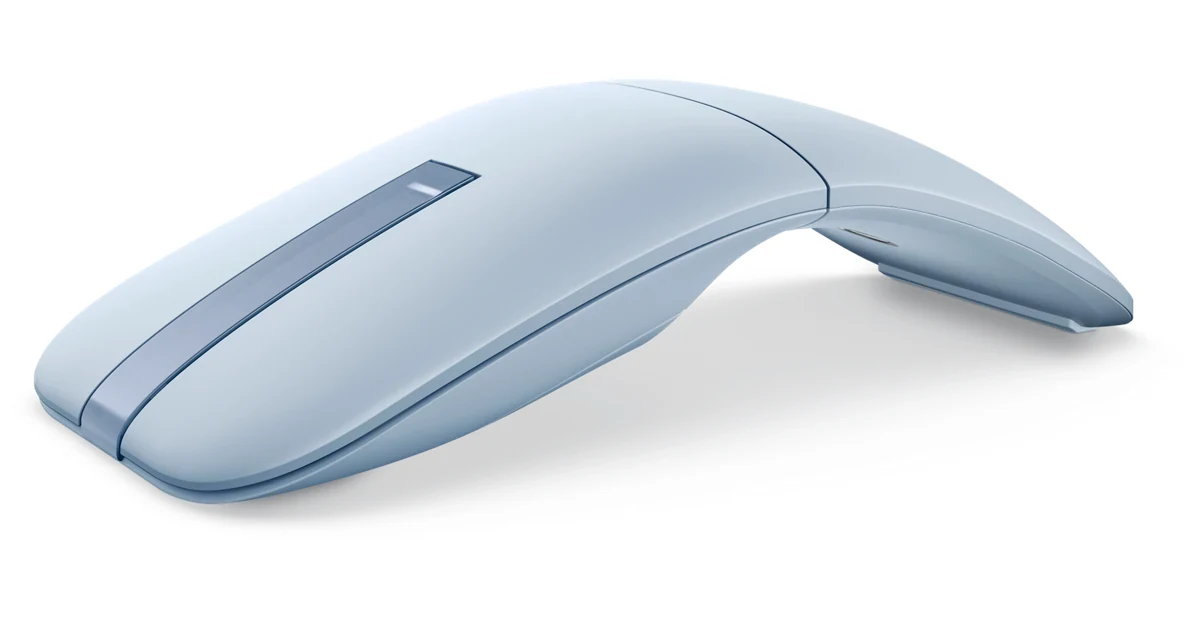
Dell Bluetooth Travel Mouse MS700 - Best for business travel and light bags
Best for: Dell laptop users, business travelers, and people who want a very light Bluetooth mouse with adjustable DPI. Skip if: You want a wheel, side buttons, gaming-grade polling, or a full palm-grip shape.
Product image source: Dell official product media.
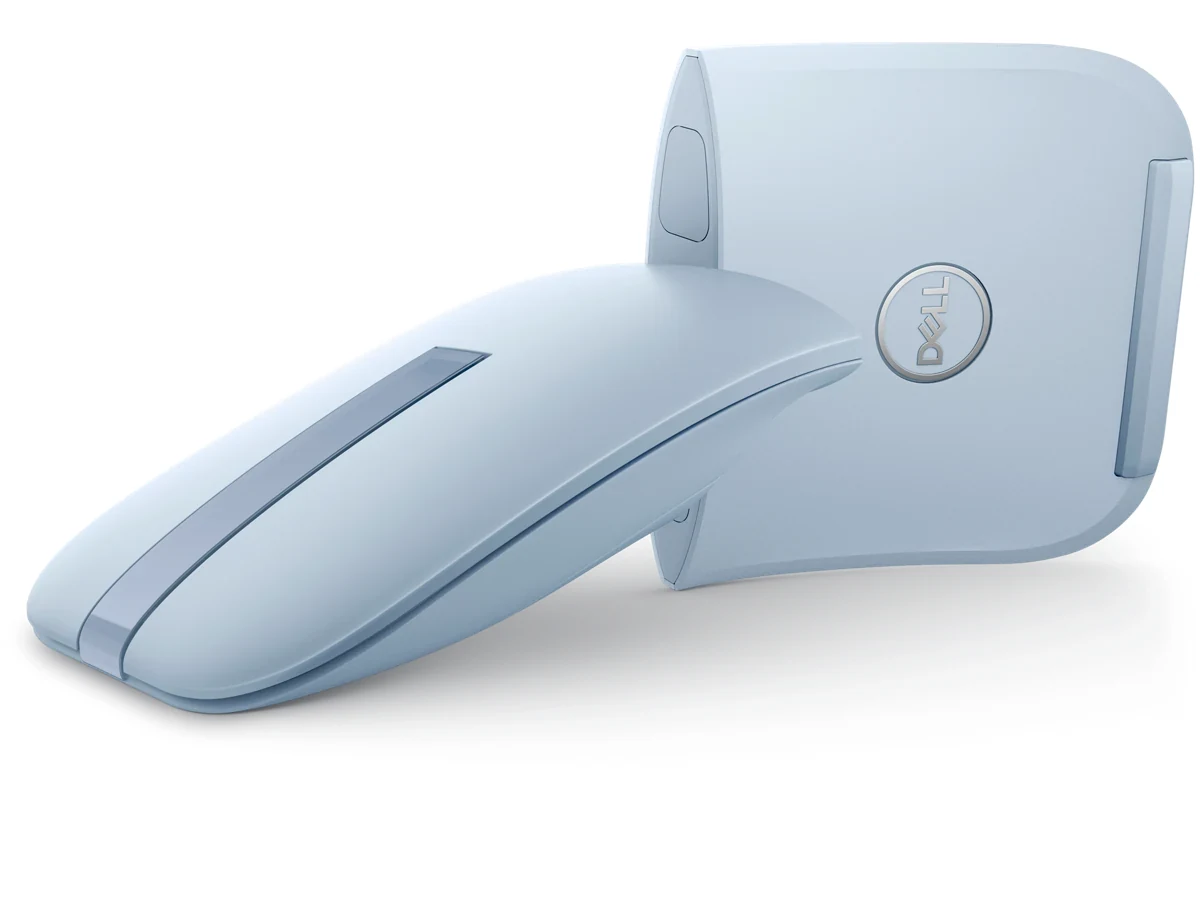
Check current product pageThe MS700 is the most travel-specific design here. The twist body matters because it should protect the shape in a bag and turn the mouse into a flatter object when packed. The tradeoff is clear: two buttons and touch scroll are minimalist. Before keeping it, I would test whether the touch-scroll strip feels natural in long documents and whether 1600 DPI feels right on a laptop display.
Verified details:
- Dell lists Bluetooth 5.0 LE, optical LED tracking, two buttons, Touch Scroll, Swift Pair, and adjustable 1000/1600/2400/4000 DPI.
- Dell lists 2.01 oz weight, 4.6 x 2.3 x 1.2 in dimensions, two included AAA batteries, and up to 24 months run time.
- The Dell static source did not expose a stable current price, so the price should be rechecked before publishing or buying.
Microsoft Surface Arc Mouse - Best premium flat-pack rival
Best for: Surface users, premium laptop bags, and people who want a mouse that snaps flat when not in use. Skip if: You dislike the Arc shape, need adjustable DPI, or want long battery life like the Dell or Logitech.
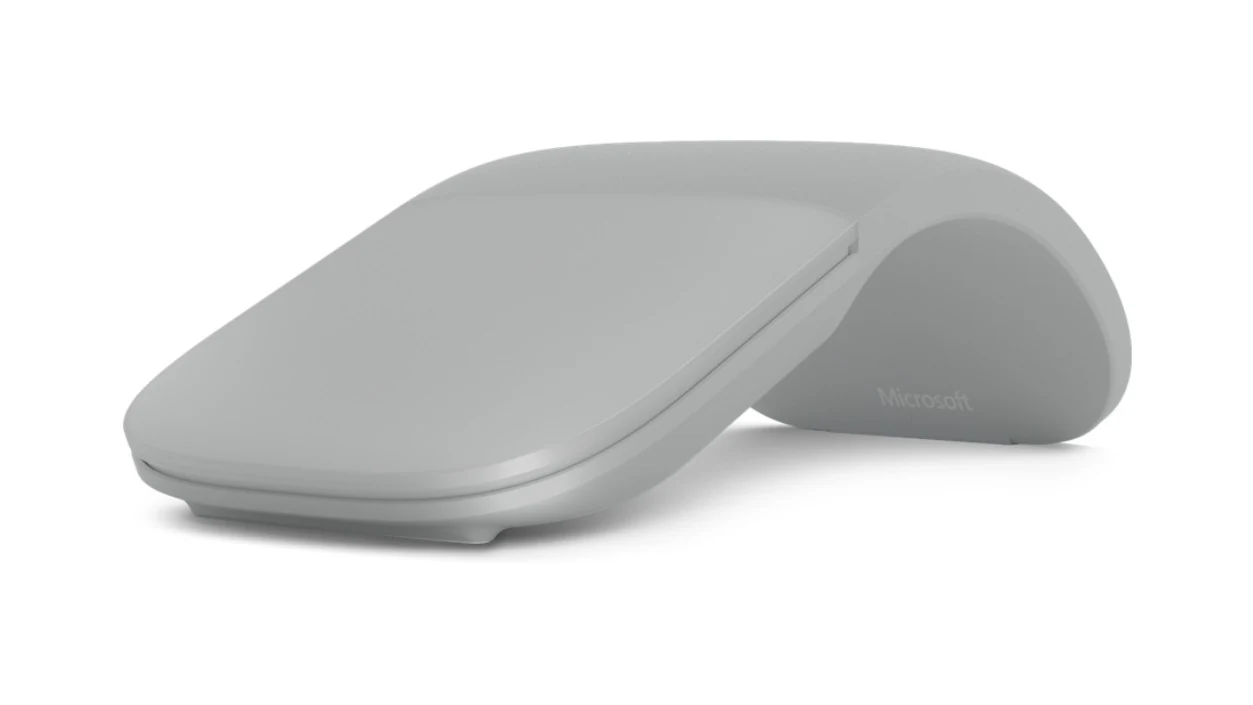
Product image source: Microsoft official product media.
Check current product pageThe Arc Mouse is the design competitor to beat because its whole identity is travel. It curves up to use and snaps flat to pack. On paper, the caution is battery life and DPI flexibility: Microsoft lists up to 6 months and 1000 points per inch, while Dell and Logitech both advertise 24 months and broader DPI options.
Verified details:
- Microsoft describes a slim mouse that conforms to your hand and snaps flat for a bag.
- Microsoft lists 2 AAA batteries, up to 6 months battery life, 2.91 oz weight, and 5.17 x 2.17 x 0.56 in dimensions.
- Microsoft lists BlueTrack technology, 1000 points per inch, two buttons, and full horizontal plus vertical scrolling.
Logitech Pebble Mouse 2 M350s - Best budget everyday portable mouse
Best for: Students, quiet offices, shared desks, tablets, and anyone who wants multi-device Bluetooth without paying premium travel-mouse prices. Skip if: You need a twist-flat or snap-flat shape, a premium travel feel, or a wider palm support.
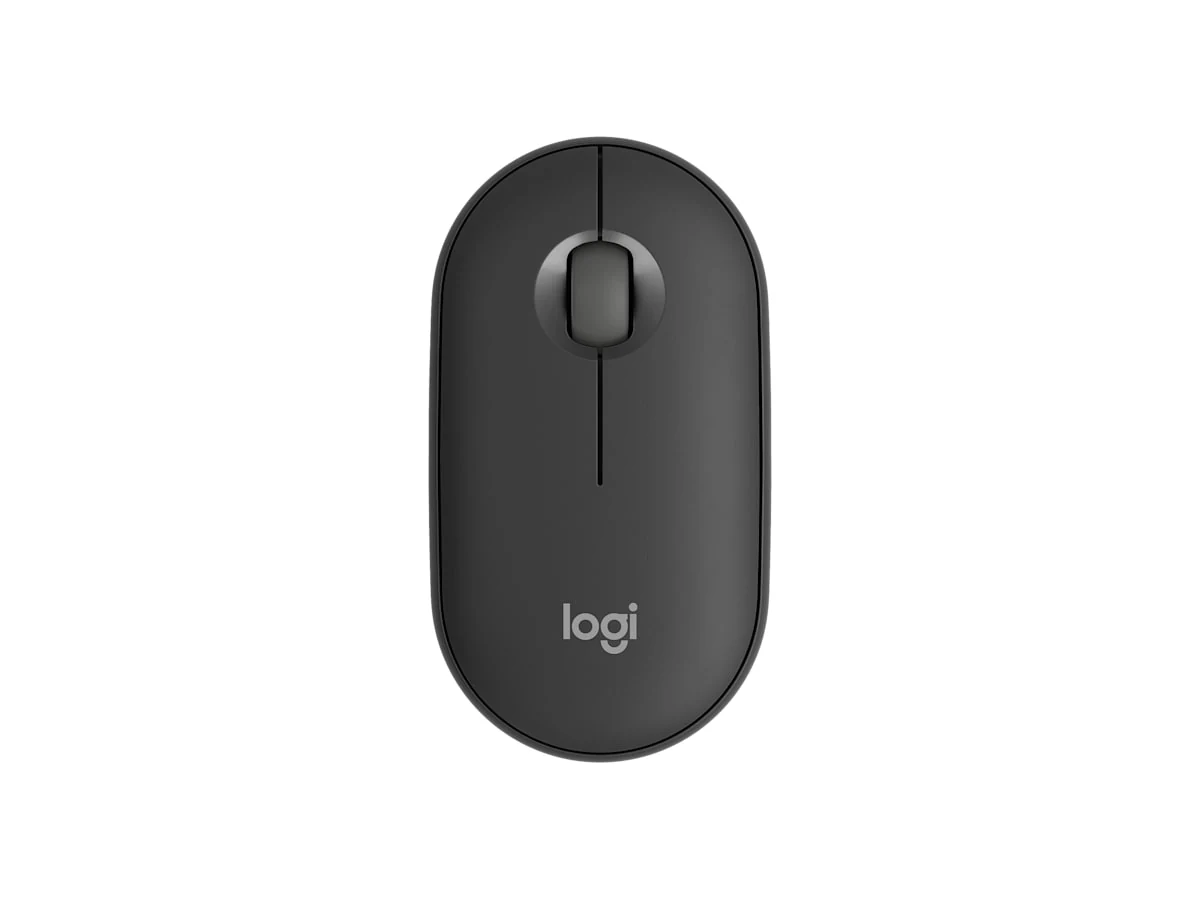
Product image source: Logitech official product media.
Check current product pageThe Pebble Mouse 2 is not as clever mechanically as the Dell or Microsoft mouse, but it is the safest everyday value. It has a real scroll wheel with middle click, quiet clicks, three Bluetooth channels, and adjustable DPI. In the first five minutes after pairing, I would check whether the low rounded body is comfortable enough for your hand, because that shape is the main compromise.
Verified details:
- Logitech lists Bluetooth Low Energy, three Easy-Switch Bluetooth channels, Logi Bolt compatibility, and a customizable middle button through Logi Options+ on Windows and macOS.
- Logitech lists 2.68 oz weight including battery, 4.20 x 2.31 x 1.05 in dimensions, one AA battery, and 24 months battery life.
- Logitech lists 1000 DPI nominal tracking and a 400-4000 DPI adjustable range in 100 DPI increments.
Portability: Twist vs Snap-Flat vs Slim Pebble
The Dell and Microsoft mice solve travel with movement in the shell. Dell twists; Microsoft bends flat. Logitech solves it by staying small and simple. That difference matters more than a spec sheet if you carry the mouse every day.
Best if your bag is tight and you want the lightest option in this comparison. The twist mechanism is the feature to inspect: it should feel secure, not gimmicky.
Best if a flat packed shape matters more than battery life. The curve is polarizing, so buy it only if you can live with the arch.
Best if you want a normal cheap mouse that travels well. It does not transform, but it has the most conventional controls.
Relevant Videos for Each Mouse
These videos are embedded to show the physical shape, packing idea, and setup cues that static product images cannot show. Use them as a visual supplement, not as a replacement for checking the current product pages and running your own mouse tests after pairing.
Dell Bluetooth Travel Mouse MS700

Summary: This Dell MS700 overview is useful because it shows the real travel shape, color options, and physical handling around the twist body. Watch it before buying if your main question is whether the mouse looks bag-friendly and whether the minimalist two-button/touch-scroll idea feels acceptable.
Microsoft Surface Arc Mouse

Summary: This Microsoft Arc Mouse introduction focuses on the signature snap-flat design and curved use position. It helps compare the Arc approach against Dell's twist design: Microsoft makes the mouse flatter for the bag, while Dell makes the body rotate into travel mode.
Logitech Pebble Mouse 2 M350s

Summary: This Logitech Support unboxing shows the Pebble Mouse 2 shape and what the package/setup experience looks like. It is most useful for judging the low-profile body and whether the simple budget travel design is enough without a folding or twisting shell.
What I Would Test After Pairing Any Travel Mouse
Do this before the return window closes. A travel mouse can look perfect in official images and still fail your real setup because of scroll feel, Bluetooth stability, surface tracking, or button behavior.
- Clicks and scroll
Open the online mouse tester and verify left click, right click, middle click where available, and scroll behavior.
- DPI feel
Use the mouse DPI tester to see whether the cursor distance feels close to the advertised DPI or your old mouse.
- Bluetooth report stability
Run the mouse polling rate test while moving the mouse in normal Bluetooth mode. Do not expect gaming-wireless numbers; look for stability.
- Surface drift
Use the mouse drift test on a hotel desk, glassy table, mouse pad, and laptop tray if you travel often.
- Perceived delay
If the pointer feels behind your hand, compare it with the input latency checker so you do not blame the mouse for a slow display or busy system.
Which One Should You Buy?
You want the lightest travel mouse here, long battery life, adjustable DPI, and a design that packs by twisting. It is the most business-travel-focused option.
You already like Microsoft Surface hardware and want the premium snap-flat experience with horizontal and vertical scrolling. Accept the shorter battery claim.
You want the safest low-cost portable mouse with quiet clicks, a scroll wheel, three-device switching, and 24-month battery life.
You need side buttons, high polling, low click latency, or gaming software. A 2.4 GHz gaming mouse is a different product category.
Related Mouse Guides and Tools
Sources and Product Pages Checked
Official product pages were used first for specs and official images. Prices and availability can change quickly, so the publisher should recheck product pages before live deployment.
- Dell Bluetooth Travel Mouse MS700 official product page
- Microsoft Surface Arc Mouse official product page
- Logitech Pebble Mouse 2 M350s official product page
- Logitech Pebble Mouse 2 M350s support specifications
FAQ: Dell MS700 and Portable Bluetooth Mice
- Is the Dell MS700 better than the Microsoft Surface Arc Mouse?
The Dell MS700 is better if you care about lighter weight, longer advertised battery life, adjustable DPI, and Bluetooth 5.0 LE. The Surface Arc Mouse is better if the snap-flat shape and Microsoft Surface design language matter more to you.
- Is the Dell MS700 good for gaming?
No, not as a serious gaming mouse. It is a portable Bluetooth travel mouse with two buttons and touch scroll. For gaming, choose a 2.4 GHz wireless or wired gaming mouse and test polling, DPI, and click behavior separately.
- Which portable mouse has the best battery life?
Dell lists up to 24 months for the MS700 with two AAA batteries, and Logitech lists up to 24 months for Pebble Mouse 2 with one AA battery. Microsoft lists up to 6 months for Surface Arc Mouse. Real battery life depends on usage and Bluetooth conditions.
- Which one is best for quiet office use?
The Logitech Pebble Mouse 2 is the strongest quiet-office pick because Logitech specifically lists Silent Touch click-noise reduction and a conventional scroll wheel. Dell can still be quiet enough for travel, but its main claim is twist portability, not silent clicks.
- Should I buy a Bluetooth mouse or a 2.4 GHz mouse?
Use Bluetooth when laptop portability and fewer dongles matter. Use 2.4 GHz wireless when gaming, high polling, and lower latency matter. These three mice are travel and office mice, not esports mice.
- How should I test a travel mouse after buying it?
Check every button and scroll input, compare DPI feel, test Bluetooth report stability, try several surfaces, and watch for cursor drift or delay. Do those checks before the return window closes.
After choosing a travel mouse, do not judge it only by the box. Pair it, open the mouse tester, confirm the scroll and buttons, then run a quick DPI check and drift test on the surfaces where you actually work.





Reader discussion
Comments
Share what worked, what did not, or what you would test next. Every comment is reviewed before it appears.
Loading approved comments…
Leave a comment
No account or sign-in is required. Links and HTML are not accepted.