




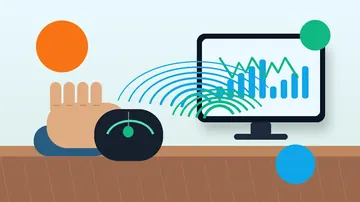








Fast answer: Butterfly clicking is usually faster: it sustains roughly 15-25 CPS by alternating two fingers on one button, while jitter clicking holds around 10-14 CPS by vibrating a tensed forearm. Jitter is harder on your hand and shakes your aim; butterfly is steadier but can stray into accidental double-clicks that anti-cheat flags. Neither technique is banned as a technique on most servers - autoclickers and macros are - but sustained 20+ CPS can trip detection like Hypixel Watchdog. The honest way to decide is to measure both on the click speed tester: run a jitter burst, then a butterfly burst, and compare your real CPS, peak CPS, and consistency before you commit to a style.
The "jitter clicking vs butterfly clicking" question is everywhere on Hypixel, Badlion, and CubeCraft forums, but most answers are someone's gut feeling with no numbers behind it. This guide gives you the honest mechanics, realistic CPS ranges, aim and fatigue trade-offs, and the actual ban nuance - then it hands you the part the forums cannot: a live click speed tester where you measure your own jitter CPS against your own butterfly CPS. Read the comparison, then test both and let your hands settle the argument.
Jitter Clicking vs Butterfly Clicking at a Glance
Both are physical clicking techniques that push your clicks per second well above the 6-8 CPS most people manage with normal clicking. They get there differently, and those differences decide which one suits your hand, your game, and your tolerance for risk. Here is the short version before the detail.
| Factor | Jitter clicking | Butterfly clicking |
|---|---|---|
| Typical sustained CPS | ~10-14 CPS | ~15-25 CPS |
| Speed ceiling | High in short bursts, hard to sustain | Higher and easier to hold |
| Aim and control | Worse - arm tension shakes the cursor | Better - hand stays calmer |
| Hand fatigue | High - constant forearm/wrist tension | Moderate - lives in two fingers |
| Main risk | Strain and unstable aim | Accidental double-clicks flagged by anti-cheat |
| Ban status (technique) | Allowed as a technique; macros are not | Allowed as a technique; macros are not |
| Mouse needs | Almost any mouse, stable grip helps | Benefits from low debounce and a clean left switch |
What Is Jitter Clicking, and What CPS Can It Hit?
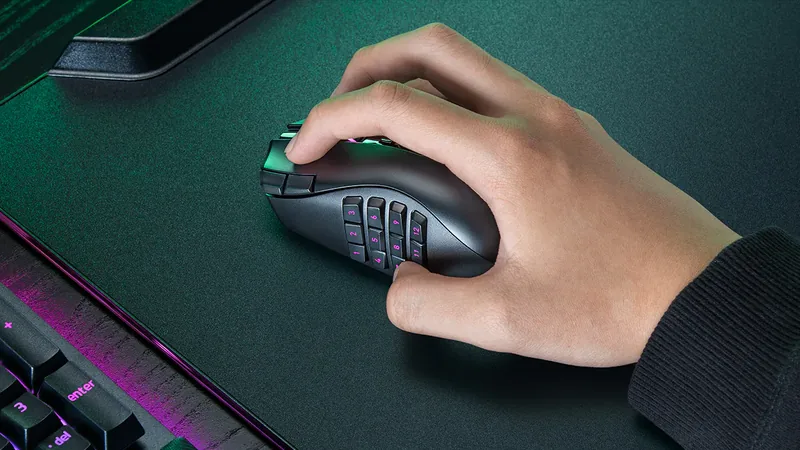
Jitter clicking means tensing your forearm and wrist so the muscles tremor, then letting that controlled shake tap the mouse button rapidly. You are not consciously moving one finger up and down; you are channeling a vibration through a stiff arm into the button. Done well it reaches roughly 10-14 CPS in sustained play, and skilled jitter-clickers can spike higher in short bursts. The catch is that the same tension that produces the speed also travels into your aim and your tendons.

What Is Butterfly Clicking, and What CPS Can It Hit?
Butterfly clicking uses two fingers - usually index and middle - alternating on the same mouse button so the presses overlap and effectively double your click rate. Because each finger only has to move at a normal pace, butterfly clicking commonly sustains 15-25 CPS and is easier to hold for a long fight than jitter. The risk is the flip side of its strength: when two overlapping presses register too close together, the mouse or the server can read them as double-clicks, which is exactly the pattern anti-cheat watches.
Head-to-Head: Which Technique Is Actually Faster?
On raw, sustained clicks per second, butterfly clicking wins for most players. It typically holds a higher number for longer because each finger works at a comfortable speed, while jitter relies on muscle tremor that fatigues and drifts. Jitter can match or briefly beat butterfly in a very short burst, but it is far harder to keep clean. The only number that matters, though, is yours - hand size, finger length, mouse shell, and switch all change the result, which is why measuring beats guessing.
| Scenario | Faster technique | Why |
|---|---|---|
| Sustained clicking through a long fight | Butterfly | Each finger works at a normal pace, so the rate holds without fatigue. |
| A single 1-2 second burst | Roughly even | A trained jitter burst can briefly match butterfly before tension drifts. |
| Clicking while tracking aim | Butterfly | Less arm movement means the higher CPS does not wreck your tracking. |
| On a mouse with heavy debounce | Jitter | Debounce can cap overlapping butterfly presses; jitter is less affected. |
Aim and Control: Which Is Easier to Click and Track With?
Speed is half the fight; the other half is whether you can still aim while you click. This is where jitter clicking pays a tax. The forearm tension that powers the shake also feeds micro-movement into your cursor, so tracking a strafing opponent gets harder the faster you jitter. Butterfly clicking keeps the hand far calmer because the clicking work lives in two fingers, not the whole arm, so your aim stays steadier. For tracking-heavy fights, the steadier technique usually wins even at equal CPS.
Hand Fatigue and Safety: Which Is Harder on Your Hand?
Both techniques stress your hand, but jitter clicking is the more demanding one. It relies on constant wrist and forearm tension, and holding that tension through long sessions is a known route to soreness and, over time, repetitive strain. Butterfly clicking is gentler on the muscles but adds its own wear: the rapid double-finger action multiplies switch actuations and can accelerate the day your mouse starts double-clicking on its own. Take breaks, stop if anything hurts, and treat any clicking technique as something to train gradually, not grind through pain.
Which Gets You Banned? Server Rules for Jitter, Butterfly, and Drag Clicking
Here is the honest, frequently-misunderstood part. On most major servers, including Hypixel, jitter and butterfly clicking are not banned as techniques - they are physical inputs, not software. What gets banned is automation: autoclickers, click macros, and any tool that turns one input into many outputs. The working rule communities repeat is "one input, one output." The gray zone is sustained very high CPS. Hypixel's Watchdog can flag long stretches above roughly 20 CPS, and butterfly clicking that registers as constant double-clicks looks statistically like a macro even when it is not. Drag clicking sits in a similar place: allowed as a technique, but high-CPS drag bursts in PvP are discouraged on many servers. Rules vary by server and change over time, so the only safe answer is to read the current rules of the exact server or tournament you play. For the third technique, see our drag click guide, which covers its own ban and switch-wear nuance in depth.
The line that actually matters: A browser CPS test only proves your device can generate the clicks. It does not prove a given server will accept that pattern. Keep clicking natural, avoid sustained 20+ CPS in ranked play, and never use software that clicks for you - that is the difference between a fast hand and a ban.
Mouse and Switch Requirements for Each Technique
Neither technique needs an exotic mouse, but the hardware shapes the ceiling. Jitter clicking works on almost anything because the speed comes from your arm, though a lighter mouse and a stable grip help you keep the shake from sliding the whole mouse. Butterfly clicking leans more on the switch: aggressive firmware debounce - the deliberate delay that filters out switch chatter - can also filter the overlapping butterfly presses and cap your CPS no matter how fast your fingers move. A mouse with a clean, well-separated left button and reasonable debounce gives butterfly clicking the most headroom. Both techniques wear switches faster than normal clicking, so check switch health regularly.
Test Your Own Jitter vs Butterfly CPS
This is the whole point of the guide. Averages are a starting line, not your number. Open the click speed tester, run one short burst with each technique, and let your own hands decide - the data is more honest than any forum thread.
Click Speed Test (CPS): Measure your real jitter CPS and butterfly CPS, peak CPS, and consistency in a timed run.
How to compare both techniques fairly
- Pick one duration and stick to it: Use the same timed run, 5 or 10 seconds, for both techniques so the comparison is fair.
- Run a normal-click baseline first: A normal-clicking run shows what your hand does with zero technique, so the jitter and butterfly gains are clear.
- Do a jitter burst, then rest: Tense the forearm, jitter for the full run, and note both average and peak CPS. Shake the hand out before the next test.
- Do a butterfly burst: Alternate index and middle fingers on the left button for the full run, then compare the numbers and how steady each felt.
- Judge consistency, not just the peak: A technique that holds a steady number beats one that spikes once and collapses. Repeat each a few times before deciding.
Which Should You Use? Pick by Game, Grip, and Goal
There is no single best technique - there is the best one for your hand, your grip, and what you actually play. Use these decision rules, then confirm them with a real test rather than copying a streamer. This comparison covers Minecraft PvP clicking; if the same session turns into a build project, use a Minecraft circle chart separately for a round tower or dome because structure geometry does not change which clicking technique fits your hand. The block-by-block circle building guide explains how to mirror one quarter and check the finished footprint.
| Scenario | Which Should You Use? Pick by Game, Grip, and Goal | Why |
|---|---|---|
| Minecraft PvP / bridging | Butterfly for most players | Higher sustained CPS with steadier aim wins more 1v1s; keep it under flag-worthy double-click rates. |
| FPS where aim is everything | Neither at extreme CPS | Prioritize a stable hand and tracking; raw CPS matters far less than accuracy. |
| Small hands or short fingers | Jitter | Butterfly's two-finger reach can feel cramped; jitter does not depend on finger spread. |
| Wrist or tendon sensitivity | Butterfly, carefully | It avoids the constant forearm tension jitter needs, but still take breaks and stop on pain. |
| You just want a high test score | Butterfly | It posts the higher number for most people on the click speed tester. |
Whatever you land on, build it gradually. Speed that costs you aim, or hurts your hand, loses more fights than it wins. Train the technique that stays clean for a full match, not the one with the flashiest single-burst number.
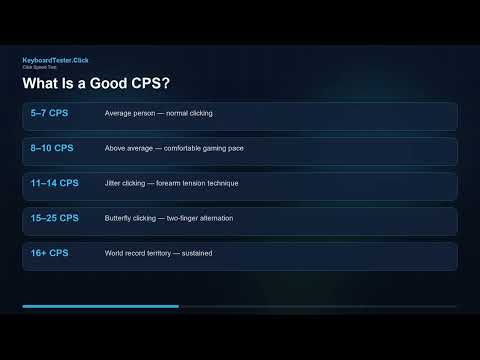
Watch: How CPS Is Measured and What the Numbers Mean
This KeyboardTester.click video walks through how clicks per second are measured and how to read your results. Use it to interpret the jitter and butterfly numbers you get on the tester below.
Sources and Research Notes
CPS ranges are presented as practical guidance from gaming-community testing, not lab measurements, and your own result on the tester is the figure that matters. Server-rule guidance is cross-checked against current Hypixel community discussion on clicking methods and anti-cheat behavior. The browser-event behavior behind any CPS test is documented by MDN.
- Hypixel: How do I drag, jitter, or butterfly clickCommunity thread on the three techniques and how servers treat them, used for the ban-nuance section.
- Hypixel: Addressing the double-clicking dilemmaLong community discussion on butterfly clicking, double-clicks, and where anti-cheat draws the line.
- Glorious: Debounce time guideExplains how debounce settings affect rapid clicking techniques such as butterfly clicking.
- MDN: Element click eventDocuments how browsers fire click events after pointer interaction, which is what a CPS test counts.
Related Tools
Measure your real jitter CPS and butterfly CPS, peak CPS, and consistency in a timed run.
Ghost Click DetectorConfirm whether fast clicks are real or a switch starting to double-click on its own.
Right Click CPS TestCompare left and right button speed, since most clicking techniques live on the left button.
Mouse Drag Click TestTry the third high-CPS technique and see its burst peak on a live timeline.
Related CPS Guides
The parent guide to clicks per second, peak CPS, and how to run an honest click speed test.
Drag Click Test and Low-CPS FixThe third clicking technique, its ban nuance, switch wear, and which mice can do it.
Right Click CPS Test ExplainedWhy your right click is slower and how to diagnose technique versus a worn switch.
Keyboard CPS Test: Spacebar SpeedApply the same speed thinking to the spacebar for jump-bridging and movement.
FAQ
- Is butterfly clicking faster than jitter clicking?For most players, yes. Butterfly clicking commonly sustains around 15-25 CPS by alternating two fingers, while jitter clicking holds roughly 10-14 CPS through forearm tremor. Jitter can briefly match butterfly in a short burst, but it is much harder to keep clean and fatigues faster. The honest way to know is to test both on the click speed tester, because your hand size, mouse, and switch all change the result.
- Is jitter clicking or butterfly clicking better for Minecraft PvP?Butterfly clicking suits most Minecraft PvP because it gives higher sustained CPS with a steadier hand, which helps you keep aim while you click. Jitter can shake your tracking. That said, butterfly clicking that registers as constant double-clicks can look like a macro to anti-cheat, so keep your rate natural and avoid sustained 20+ CPS in ranked play.
- Is jitter clicking or butterfly clicking bannable?As physical techniques, neither is banned on most servers, including Hypixel. What is banned is automation: autoclickers and click macros that turn one input into many outputs. The risk with butterfly clicking is that overlapping presses can register as double-clicks, and sustained very high CPS can trip anti-cheat like Hypixel Watchdog even when you are clicking legitimately. Rules vary by server, so always check the current rules where you play.
- What is a good CPS for jitter or butterfly clicking?For jitter clicking, sustained 10-14 CPS is solid. For butterfly clicking, 15-25 CPS is the common range and the higher end is strong. But chasing a peak number is the wrong goal: a steady, clean rate you can hold for a whole fight while still aiming beats a single high spike that collapses. Run a timed test and judge your consistency, not just your best burst.
- Does butterfly clicking damage your mouse?It accelerates switch wear. The rapid two-finger action multiplies switch actuations far beyond normal clicking, bringing the day the switch starts to double-click on its own closer. Jitter clicking adds wear too, just less per second. Check switch health with a double-click or ghost click test, and an optical-switch mouse avoids the metal-contact wear that causes chatter.
- How do I measure my jitter and butterfly CPS?Open the click speed tester, choose a fixed duration, and run one burst with each technique back to back. Note the average CPS, peak CPS, and how steady each felt. Test a normal-click baseline first so you can see the real gain from each technique, and repeat a few times before drawing a conclusion.
Stop arguing from averages. Open the click speed tester, run a jitter burst and a butterfly burst back to back, and compare your real CPS and consistency. Then run the ghost click detector to make sure your fast clicking is not just a switch starting to double-click on its own.




Reader discussion
Comments
Share what worked, what did not, or what you would test next. Every comment is reviewed before it appears.
Loading approved comments…
Leave a comment
No account or sign-in is required. Links and HTML are not accepted.