





Choosing a gaming keyboard switch is not just a color decision. "Red", "brown", "blue", "silver", "optical", and "Hall Effect" all describe different parts of the feel and sensing system, but the real question is simpler: how does the key behave when you press, hold, release, and repeat it inside a game?
This guide breaks down the major keyboard switch types from a gamer-first angle: linear, tactile, clicky, membrane, scissor, low-profile, silent, speed, optical, and Hall Effect magnetic switches. It also covers the practical pros and cons, what matters for input timing, which switches fit common game genres, and which switch type makes sense for 10 popular PC games.
Quick answer: competitive FPS players should start with smooth linear or Hall Effect magnetic switches. MOBA and MMO players should start with tactile or medium-weight linear switches. Shared-room gamers should avoid clicky switches and look at silent linear, silent tactile, or scissor switches. Casual players should prioritize comfort, layout, anti-ghosting, and reliability before chasing ultra-low actuation numbers.
Best Keyboard Switch Type by Gamer Need
| Player type | Best switch type | Why |
|---|---|---|
| Competitive FPS: Valorant, CS2, Fortnite, Warzone, Apex, PUBG | Hall Effect magnetic linear or fast standard linear | Fast repeated movement, cleaner release timing, and adjustable actuation matter more than tactile feedback. |
| MOBA: League of Legends, Dota 2 | Tactile or medium linear | Ability timing and deliberate presses matter. A small bump can reduce accidental casts. |
| MMO and RPG: World of Warcraft, Final Fantasy XIV, Diablo | Tactile, heavier linear, or silent tactile | Long sessions, chat, macros, and many binds reward control and comfort. |
| Casual, sandbox, school, family PC | Durable tactile, scissor, membrane, or budget linear | Noise, price, comfort, and reliability usually beat esports specs. |
| Streamer or shared room | Silent linear, silent tactile, or scissor | Clicky switches can leak into the microphone and annoy other people in the room. |
| Typing plus gaming | Tactile, medium linear, or low-profile tactile | A pure speed switch can feel too sensitive when writing, coding, or chatting. |
How a Keyboard Switch Actually Affects Gaming
A keyboard input passes through several layers before a game sees it. Your finger moves the key. The switch reaches an actuation point. The keyboard scans the matrix. Firmware filters or debounces the signal. The board reports over USB or wireless. The operating system queues the event. The game samples input, then the display shows the result.
That means a switch is important, but it is not the whole input-lag chain. A very fast switch on poor firmware can feel worse than a normal switch on a well-built keyboard. For serious comparisons, also check polling rate, latency behavior, rollover, and key chatter.
| Term | Meaning | Gaming impact |
|---|---|---|
| Actuation point | The travel depth where the key registers. | Shallow actuation can feel faster, but can also cause accidental presses. |
| Reset point | The point where the key becomes ready to register again after release. | Important for counter-strafing, repeated movement, rhythm inputs, and rapid tapping. |
| Operating force | How much force is needed to press the switch. | Light switches feel fast; heavier switches can be more controlled and less fatiguing for some players. |
| Total travel | How far the key can move from top to bottom. | Short travel can feel snappy, but harsh bottom-out can become uncomfortable. |
| Debounce | Filtering used to avoid duplicate signals from physical contact bounce. | Poor debounce can add delay or cause chatter. Optical and Hall Effect sensing can avoid contact bounce. |
| NKRO and anti-ghosting | How well the keyboard handles multiple simultaneous keys. | Critical for WASD plus sprint, crouch, reload, push-to-talk, inventory, and ability keys. |

Keyboard Switch Types Explained for Gamers
Not sure which family your current board uses? The what switches do I have walkthrough identifies linear, tactile, or clicky switches by sound and feel in about two minutes, without opening the keyboard.
Linear Mechanical Switches
Best for: FPS, battle royale, action games, rhythm games, and players who want a smooth press.
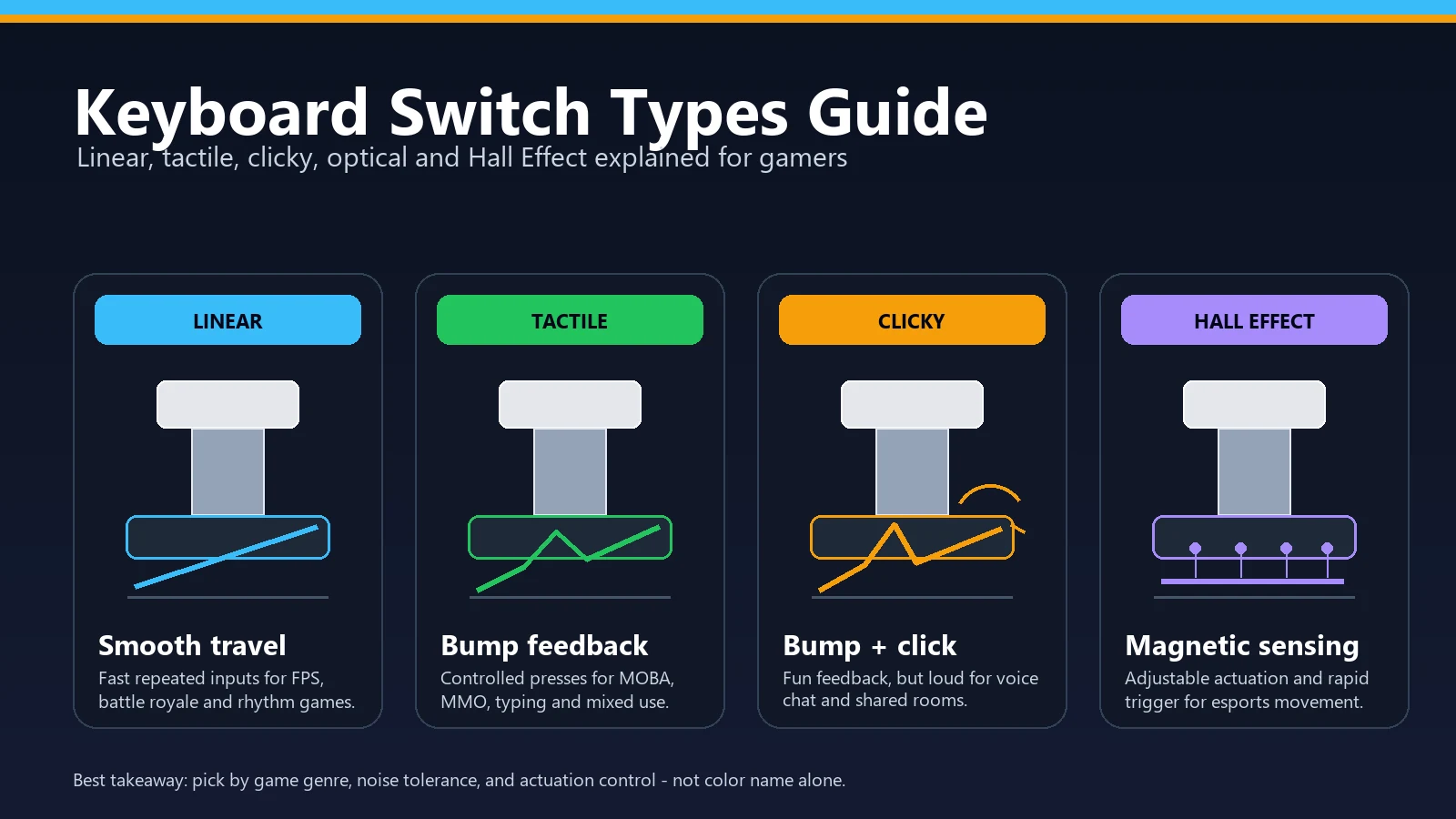
Linear switches move straight down without a tactile bump or click. Red-style switches are the best-known example, but there are many different weights and materials. For gaming, linear switches are popular because nothing interrupts the press. You can feather movement keys, tap rapidly, and release without fighting a bump.
The downside is control. Very light linear switches can register when you rest your fingers on WASD or ability keys. If you miss keys or accidentally crouch, reload, or open inventory, a slightly heavier linear can be better than the lightest speed switch.
Tactile Mechanical Switches
Best for: MOBA, MMO, RPG, typing plus gaming, coding, and players who want feedback without loud clicking.
Tactile switches include a bump during the press. Brown-style switches are the common mainstream example, though enthusiast tactile switches can have sharper or heavier bumps. The bump tells your finger that the press is happening, which can reduce accidental inputs in games with many abilities or menus.
The downside is that the bump can feel slower or less fluid for fast repeated movement. This does not make tactile switches bad for gaming. It only means they are usually less specialized for counter-strafe-heavy FPS than smooth linear or Hall Effect boards.
Clicky Mechanical Switches
Best for: users who love audible feedback, solo play, typing, and non-shared setups.
Clicky switches combine tactile feedback with an audible click. Blue-style switches are the classic example. They can feel satisfying, but they are the easiest switch type to regret if you use voice chat, stream, share a room, or play late at night.
For competitive gaming, clicky switches rarely offer an advantage. The sound can distract you and teammates, and the click mechanism is not useful for rapid movement. If you love the feel, use them. If you want the safest gaming recommendation, choose something quieter.
Hall Effect Magnetic Switches
Best for: dedicated competitive FPS and movement-heavy players.
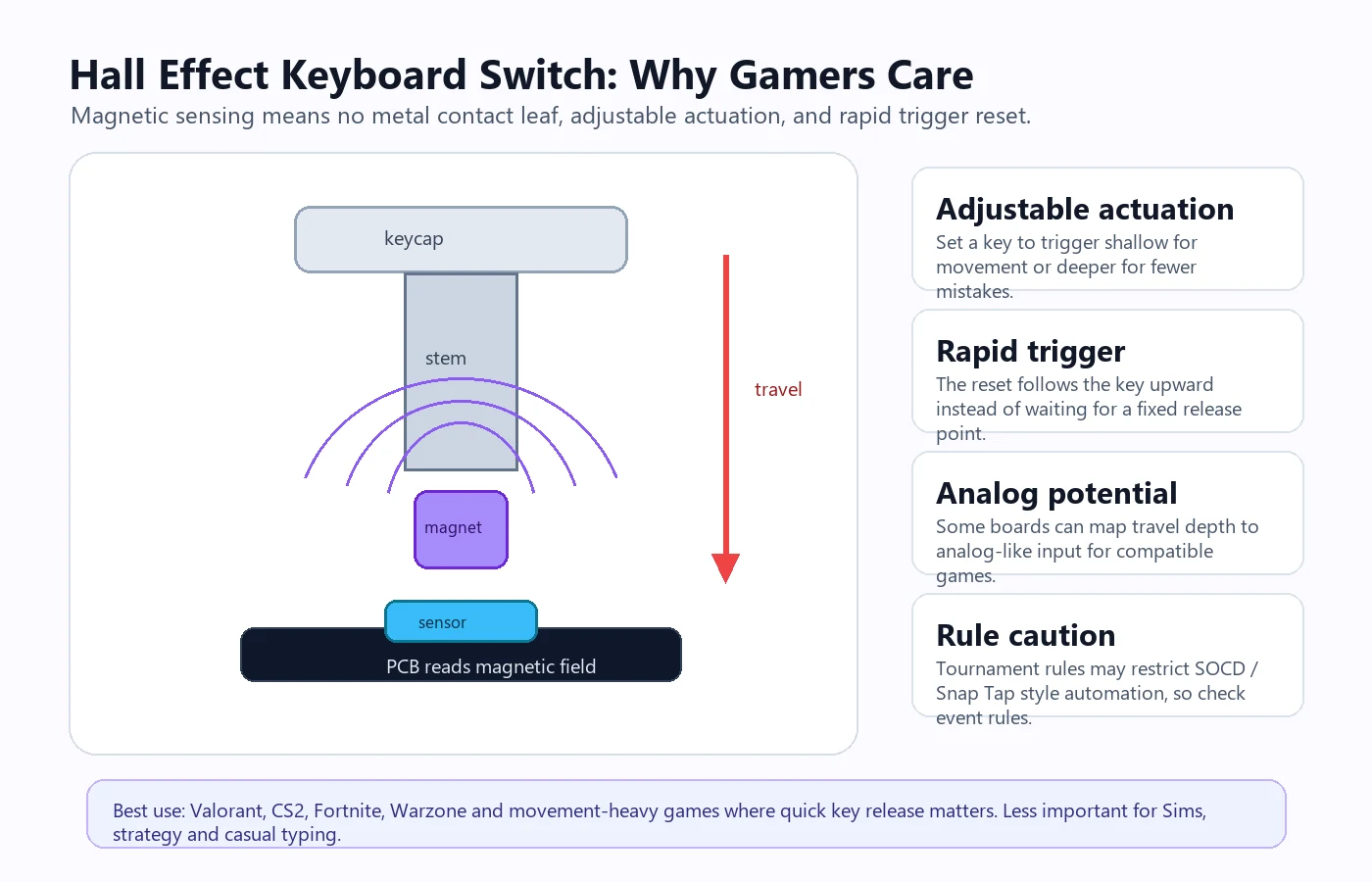
Hall Effect keyboards use magnetic sensing instead of a physical metal contact leaf. The switch normally feels linear, but the keyboard can read travel depth and let you set actuation in software. Many Hall Effect boards also include rapid trigger, where reset follows the key upward instead of waiting for a fixed release point.
This is why Hall Effect boards are popular around Valorant, Counter-Strike 2, Fortnite, Warzone, and other movement-heavy games. The benefit is not magic "more aim". The benefit is cleaner press and release timing on movement keys. If you are casual, you may not notice a huge change from a good mechanical keyboard. If you train counter-strafes daily, you may care a lot.
Before ranked play, test and tune a Hall Effect keyboard profile so low actuation does not turn into accidental movement.
Hall Effect sensing can also appear inside a more complex control system. The source-based Turtle Beach KB7 touchscreen keyboard analysis asks whether a 4.3-inch display, Swarm II dependency, and direct-USB requirement are worth adding to the adjustable-actuation features.
Optical and Analog Optical Switches
Best for: gaming boards that want fast sensing, custom actuation, or analog-style input.
Optical switches use light interruption instead of metal contact. Standard optical switches can feel linear, tactile, or clicky depending on design. Analog optical switches can track travel depth and sometimes offer adjustable actuation, similar in purpose to Hall Effect boards.
The Tartarus family shows why it helps to separate key sensing from thumb controls. In our comparison of Tartarus Pro and V2 Pro control types, both keypads have analog optical keys, while the new model adds a TMR analog thumbstick. The stick's sensor does not make its keyboard switches TMR switches.
The advantage is contactless sensing and speed. The trade-off is ecosystem lock-in: you usually cannot swap in ordinary MX-style mechanical switches unless the board specifically supports that system.
For a current low-profile implementation, see the source-based Razer Huntsman V3 Pro Low-profile TKL analysis. It separates the board's shorter travel and lower front height from manufacturer polling and latency claims that a browser cannot certify.
Silent Switches
Best for: shared rooms, streaming, late-night gaming, and office setups.
Silent linear and silent tactile switches use internal dampening to reduce bottom-out and return noise. They are not truly silent, but they are much easier to live with than clicky switches. For gamers on Discord or stream microphones, a silent switch can improve the whole setup more than a tiny latency spec.
The trade-off is feel. Dampened switches can feel softer or slightly mushier than non-silent versions. If you bottom out hard, they are still usually worth considering.
Speed Switches
Best for: players who want short pre-travel and very quick actuation without moving to Hall Effect.
Speed switches reduce the travel before actuation. They can feel fast in FPS games and rhythm games, but they are also easier to trigger by accident. Many gamers buy speed switches expecting free performance, then discover they need to relearn finger pressure.
Low-Profile, Scissor, and Membrane Switches
Best for: laptop-style users, casual gaming, portability, budget setups, and quiet keyboards.
Low-profile mechanical switches shorten the switch body and travel. Scissor switches are the laptop-style mechanism many people already know. Membrane or rubber dome keyboards use a sheet and dome system instead of individual mechanical switch mechanisms.
A current terminology edge case is the announced EMO Altar II scissor-mechanical keyboard. Its maker calls the proprietary dual-steel-arm mechanism fully mechanical, but that does not make it a conventional MX/Choc or hot-swappable design. Treat exact construction, compatibility, and repairability as separate questions instead of relying on the word “mechanical” alone.
These are not automatically bad for gaming. A good laptop keyboard with anti-ghosting can beat a poor mechanical board. But for esports and upgrade paths, mechanical, optical, and Hall Effect keyboards usually give better consistency, customization, and rollover behavior.
TMR Magnetic Switches vs Hall Effect: What Actually Changes
TMR (tunneling magnetoresistance) switches are the newest branch of the magnetic family, and in 2026 they moved from enthusiast group buys into mainstream budget lineups — Gamescom 2026 keyboard announcements from brands like Epomaker leaned on TMR boards specifically. Like Hall Effect switches, nothing physically touches to register a press: a magnet in the switch stem moves toward a sensor on the circuit board, and firmware reads travel depth continuously. The difference is the sensor element itself. A Hall sensor outputs a voltage that varies with magnetic field strength, while a TMR sensor changes its electrical resistance as the field changes.
Manufacturers claim TMR sensors respond to smaller field changes and draw noticeably less power, which on paper means finer travel resolution and longer battery life on wireless boards. Treat those as spec-sheet claims rather than felt differences: a browser cannot read which sensor sits under a keycap, and there is no reviewer consensus yet that TMR feels different from a good Hall Effect board in actual play. The gamer-facing feature set is the same category — adjustable actuation, rapid trigger, and analog-style input on a switch that still feels linear.
The practical buying advice is therefore identical to Hall Effect: buy the implementation, not the acronym. Actuation range, rapid-trigger quality, software stability, and tournament-legality of advanced features matter far more than whether the sensor is Hall or TMR. Whatever arrives, verify the behavior you paid for the same way as any magnetic board: confirm every key registers cleanly, and check a high polling claim with the keyboard polling rate test instead of trusting the box. For where magnetic boards currently sit against conventional mechanical picks, the best gaming keyboards roundup keeps the price tiers in one place.
Pros and Cons of Each Switch Type
| Switch type | Pros | Cons | Best gaming fit |
|---|---|---|---|
| Linear mechanical | Smooth, fast-feeling, widely available, many budget options. | Can cause accidental presses if very light. | FPS, battle royale, action, rhythm. |
| Tactile mechanical | Feedback without loud click, good control, strong for typing plus gaming. | Bump can feel less fluid for rapid movement. | MOBA, MMO, RPG, strategy, mixed use. |
| Clicky mechanical | Clear sound and feedback, satisfying for some typists. | Loud, distracting, bad for voice chat, not ideal for shared rooms. | Solo casual play if you love the feel. |
| Silent linear/tactile | Much quieter, friendly for streaming and late-night gaming. | Dampened feel can be softer or less crisp. | Discord, streaming, family rooms, work plus play. |
| Speed switch | Short pre-travel, quick response feel. | Easy to mispress, not always better than normal linear. | FPS and rhythm if you have disciplined fingers. |
| Optical | Contactless sensing, fast firmware designs, sometimes adjustable. | Less cross-compatible with normal mechanical switches. | Gaming keyboards with strong software. |
| Hall Effect magnetic | Adjustable actuation, rapid trigger, no contact bounce, analog potential. | Usually linear-only feel, needs software, costs more, advanced features may be restricted in tournaments. | Competitive FPS and movement-heavy games. |
| TMR magnetic | Same adjustable actuation and rapid trigger as Hall Effect; claimed finer sensing and lower power draw for wireless. | Newest ecosystem, claims not independently settled, still linear-only feel and software-dependent. | Competitive FPS, wireless magnetic boards, budget magnetic entries. |
| Membrane/rubber dome | Cheap, quiet, familiar. | Less consistent, limited rollover on many boards, less customizable. | Casual gaming and budget setups. |
| Scissor/low profile | Short travel, slim design, comfortable for many laptop users. | Less keycap/switch customization, repair can be harder. | Portable gaming, laptop-style typing, low-noise setups. |
Important: switch color names are not universal. "Red" usually means linear and "brown" usually means tactile, but force, material, sound, factory lube, travel, and quality vary by brand. Read the switch spec, not only the color.
Recommended Keyboard Switch Type for 10 Popular PC Games
Popularity changes month to month, so this list blends two signals: Newzoo's PC monthly-active-user ranking and Steam's public current-player charts. It also covers the games gamers most often compare keyboard switches for: movement shooters, MOBAs, sandbox games, MMOs, and casual life sims.
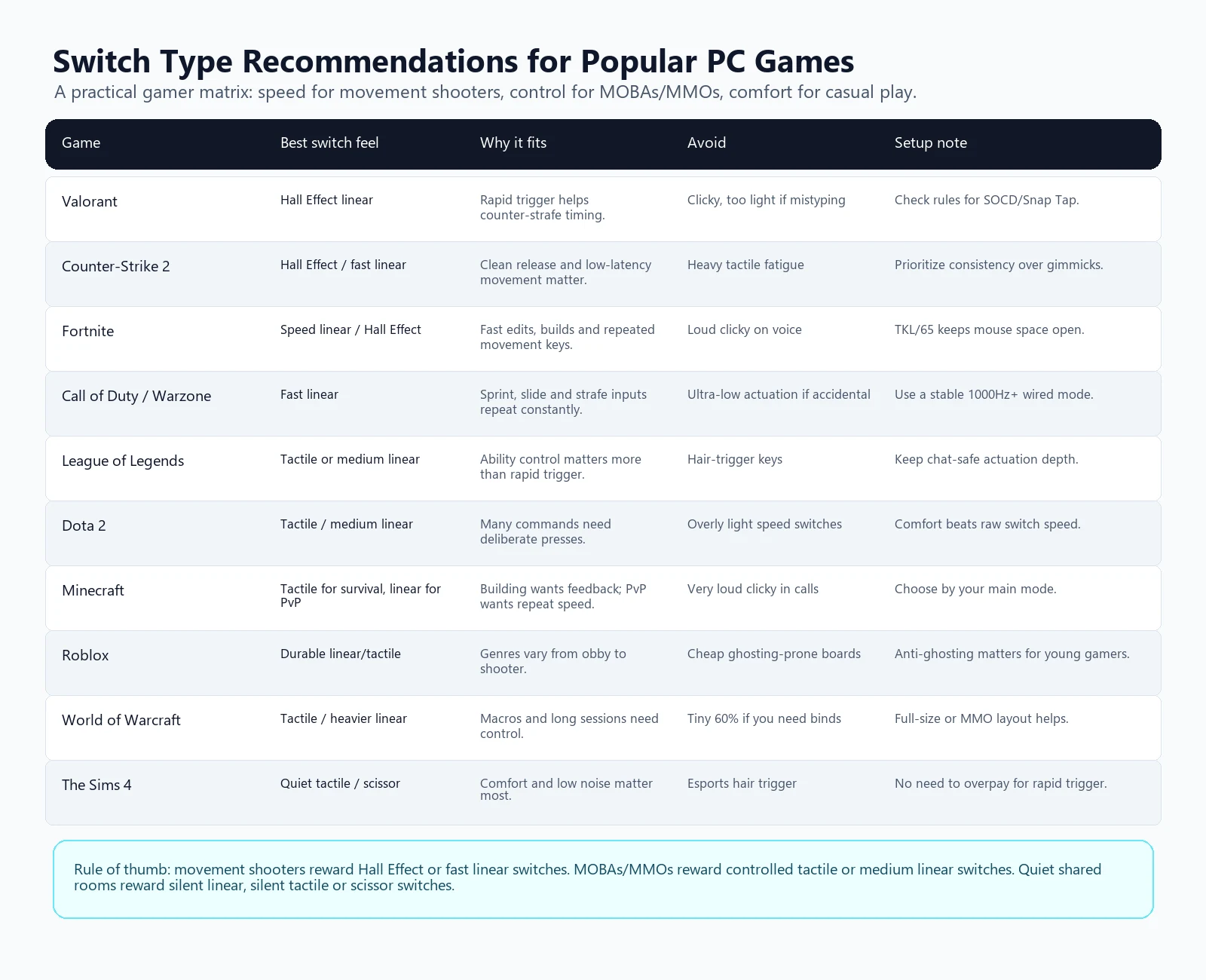
| Game | Recommended switch type | Why | Avoid |
|---|---|---|---|
| Valorant | Hall Effect magnetic linear | Counter-strafing and movement correction benefit from rapid trigger and adjustable release behavior. | Clicky switches and extremely low actuation if you fat-finger abilities. |
| Counter-Strike 2 | Hall Effect or fast standard linear | Clean A/D release timing matters, but consistency matters more than the lowest possible actuation point. | Heavy tactile switches if they slow your strafing rhythm. |
| Fortnite | Speed linear or Hall Effect | Builds, edits, weapon swaps, and movement are input dense. Fast travel can help if you control it. | Very loud clicky switches on voice chat. |
| Call of Duty / Warzone | Fast linear | Sprint, slide, crouch, strafe, reload, and tactical inputs repeat constantly. | Ultra-light switches if you accidentally crouch or reload. |
| League of Legends | Tactile or medium linear | Abilities, item actives, chat, pings, and camera controls benefit from controlled input. | Hair-trigger actuation if you miscast skills. |
| Dota 2 | Tactile or medium linear | Many commands, items, courier actions, control groups, and chat make deliberate feedback useful. | Overly light speed switches unless you already know you like them. |
| Minecraft | Tactile for survival/building, linear for PvP | Building and inventory work benefit from feedback. PvP and parkour benefit from smooth repeat input. | Clicky switches if you play in voice calls. |
| Roblox | Durable tactile or linear | Roblox covers many genres, so durability, anti-ghosting, and comfort matter more than one switch style. | Cheap ghosting-prone keyboards if the player holds many keys at once. |
| World of Warcraft | Tactile or heavier linear | Long sessions, chat, macros, mounts, bags, push-to-talk, and many keybinds reward control. | Tiny layouts if you need many dedicated binds. |
| The Sims 4 | Quiet tactile, scissor, or membrane | Comfort, quietness, and layout matter more than rapid trigger. | Expensive esports switches if Sims is your main game. |
If your main game is PUBG or Apex Legends, use the same basic guidance as Warzone: fast linear or Hall Effect for movement, but do not set actuation so shallow that you mispress crouch, inventory, or healing keys. If your main game is Overwatch, use the Valorant/Fortnite side of the table for movement heroes and the MOBA side for ability-heavy support play.
Keyboard Type Recommendations by Budget
| Budget | Best target | What to prioritize |
|---|---|---|
| Under $40 | Good membrane or budget mechanical linear/tactile | Anti-ghosting, stable USB, layout, and return policy. Do not chase fake "mechanical feel" claims. |
| $50 to $100 | Mechanical linear/tactile or entry Hall Effect | Hot-swap support, decent stabilizers, 1000Hz wired mode, and software that does not break core keys. |
| $100 to $180 | Quality mechanical, optical, or Hall Effect board | Layout, warranty, sound, keycaps, switch quality, rapid trigger if you play FPS. |
| $180+ | Premium Hall Effect, aluminum mechanical, or custom build | Only pay extra if you care about feel, software control, build quality, acoustics, or specialist features. |
For specific keyboards, see the current best mechanical keyboards for gaming 2026 guide. For switch testing after buying, use the workflow below. And if the $180+ custom-build row tempts you, the V4N4G0N 45% custom mechanical build guide shows what a compact from-parts build actually involves.
And if you are curious how far past the enthusiast tier this hobby goes, the most expensive luxury keyboards roundup tours seven boards where the price stops being about switch specs at all.
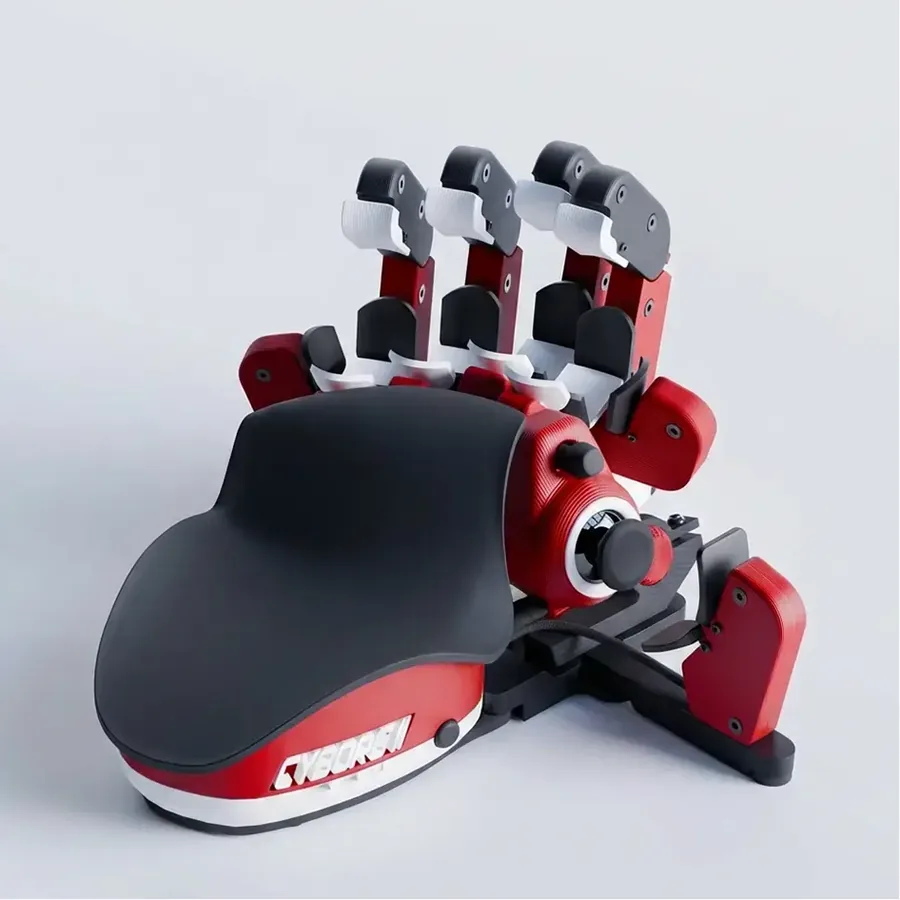
Playing FPS or MOBA titles with WASD and a handful of binds? Compact one-handed gaming keypads put the same switch choices into a half-size board that leaves the rest of the desk to your mouse.
Relevant Video: Keyboard Switch Types Explained

How to Test a Keyboard After Choosing Switches
Switch feel is subjective, but keyboard reliability is testable. After buying or borrowing a keyboard, run these checks before you decide to keep it.
- Use the Keyboard Tester to confirm every key registers.
- Use the Keyboard Ghosting Test and N-Key Rollover Test for multi-key combinations.
- Use the Keyboard Polling Rate Test to compare wired, wireless, and high-polling modes.
- Use the Input Latency Checker to check the broader response chain.
- Use the Key Repeat Rate Test if held keys behave strangely.
- Use the Keyboard Sound Test if you care about mic noise or shared-room volume.
- If a key repeats twice, read the keyboard chatter fix guide.
Sources and Research Notes
- RTINGS mechanical switches guide explains linear, tactile, clicky, low-profile, optical, analog optical, and Hall Effect switch categories.
- RTINGS Hall Effect keyboard guide compares magnetic sensing with mechanical and optical designs, including rapid trigger and debounce implications.
- Turtle Beach switch types explainer provides mainstream definitions for switch categories and gaming keyboard terminology.
- SteelSeries mechanical switch guide is useful for cross-checking switch terminology and player-facing explanations.
- Newzoo top PC games by MAU was used for the broad PC popularity signal outside Steam-only data.
- Steam public game stats was used for the current Steam concurrent-player signal.
- Reddit discussion: clicky vs linear switches for gaming and Reddit discussion: linear or tactile switches for gaming informed the search-intent section and common buyer questions.
FAQ: Keyboard Switch Types for Gaming
What switch should I buy if I mostly play FPS?
Start with a smooth linear switch. If you play competitive Valorant, CS2, Fortnite, Warzone, Apex, or PUBG and you care about movement release timing, consider a Hall Effect magnetic board with rapid trigger. If you are casual, a good standard linear keyboard is enough.
Is Hall Effect always better than mechanical?
No. Hall Effect is better for adjustable actuation and rapid trigger, especially in movement-heavy FPS games. Traditional mechanical switches still offer more variety in tactile, clicky, silent, heavy, light, and enthusiast feel options.
Should I choose linear or tactile for gaming?
Choose linear if your main games reward fast repeated movement and smooth key release. Choose tactile if you want better feedback, do a lot of typing, play ability-heavy games, or accidentally press light linear keys.
Are blue clicky switches good for gaming?
They work, but they are rarely the best gaming recommendation. Blue-style clicky switches are loud, can leak into microphones, and do not add a real competitive advantage. Use them only if you love the sound and play in a place where noise is not a problem.
What is the quietest switch type for gaming?
Silent linear and silent tactile switches are the best mechanical options. Scissor keyboards and some membrane keyboards can also be quiet. Avoid clicky switches if quietness matters.
Do pro players use tactile switches?
Some do, but competitive FPS trends lean toward linear and Hall Effect boards because movement keys are pressed and released constantly. For MOBAs, MMOs, strategy, and mixed setups, tactile switches remain practical.
Should I use the lowest actuation setting on a Hall Effect keyboard?
Not automatically. Very shallow actuation can feel fast but can cause accidental movement or ability presses. Start around a conservative setting, then reduce actuation depth only if you stay accurate under pressure.
What keyboard switch is best for beginners?
A medium linear or light tactile switch is the safest beginner choice. It is easier to live with than a loud clicky switch and less extreme than a hair-trigger speed switch.
What keyboard switch type is best for gaming?
For competitive FPS and battle royale games, a smooth linear or Hall Effect magnetic switch is usually the best fit because it supports fast repeated movement inputs. For MOBA, MMO, typing-heavy games, and mixed use, tactile or medium-weight linear switches are often easier to control.
Are red switches good for gaming?
Yes. Red-style linear switches are popular for gaming because they move smoothly without a tactile bump. They are especially common in FPS and action games, but players who make accidental presses may prefer a slightly heavier linear or tactile switch.
Bottom Line
The best gaming switch is the one that fits your game and your hands. For competitive shooters, start with linear or Hall Effect. For MOBA, MMO, RPG, typing, and mixed use, tactile or medium linear is usually safer. For shared rooms and streaming, quietness matters. For every keyboard, test rollover, ghosting, polling behavior, and key consistency before trusting it in ranked play.
Quick Action Checklist
- Test once in a clean browser tab.
- Retest after changing ports, wireless mode, or device settings.
- Use the focused tool that matches the symptom, not only the general tester.
- Keep screenshots or notes when comparing hardware.






Reader discussion
Comments
Share what worked, what did not, or what you would test next. Every comment is reviewed before it appears.
Loading approved comments…
Leave a comment
No account or sign-in is required. Links and HTML are not accepted.