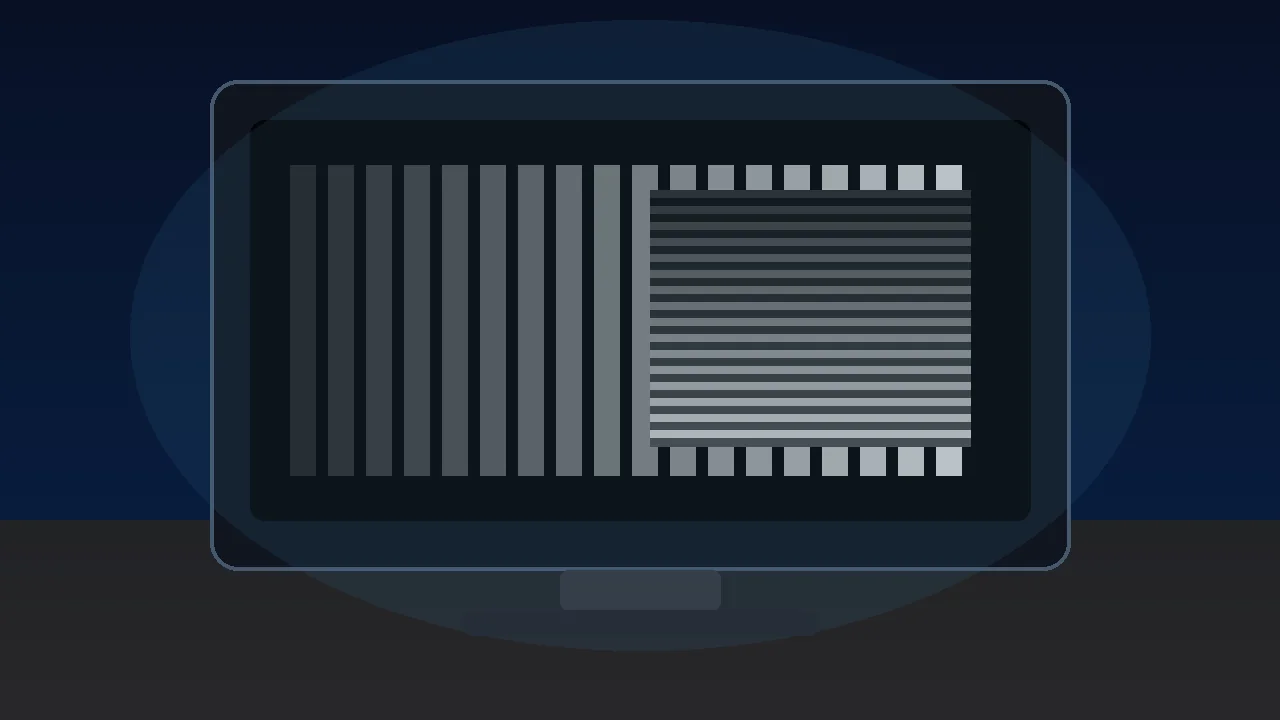

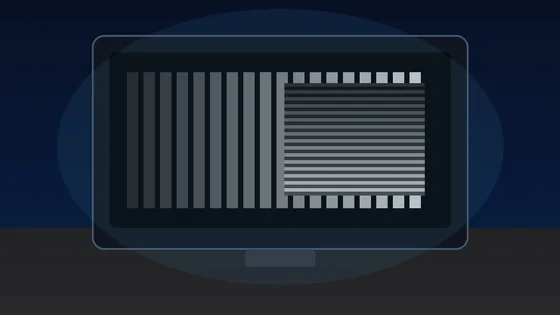




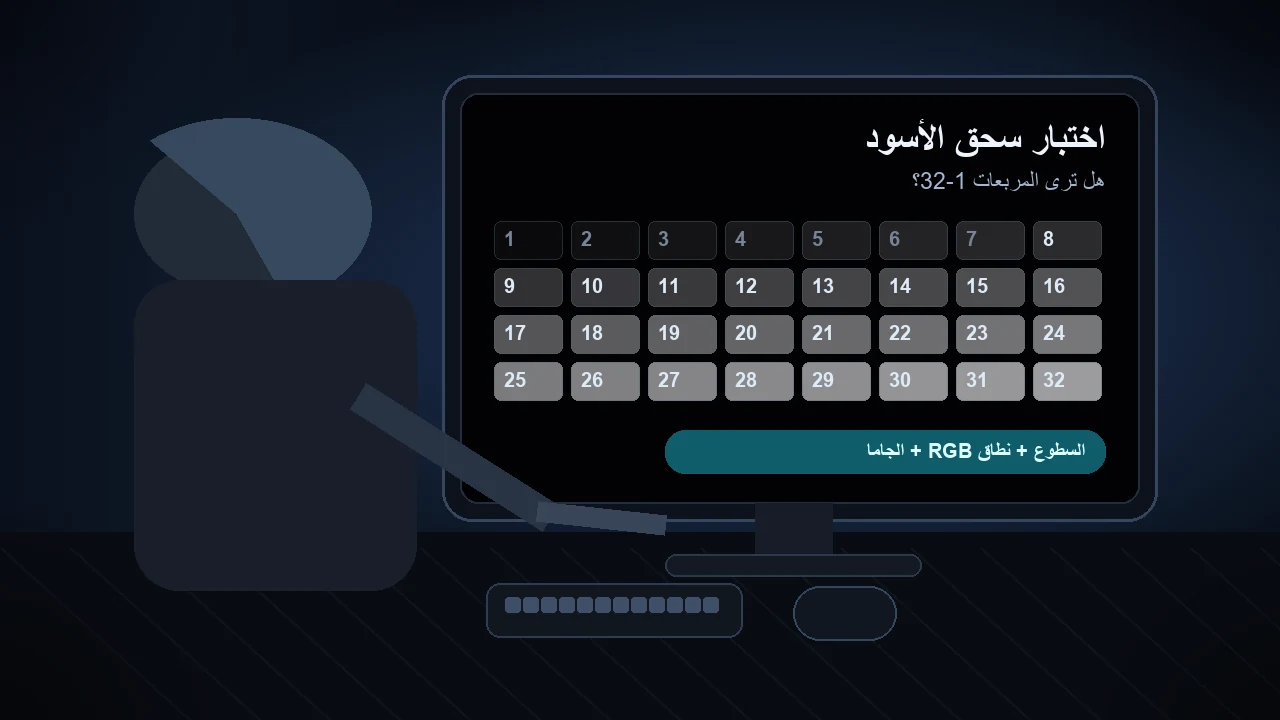
الإجابة السريعة: افتح اختبار مستوى الأسود في غرفة خافتة وابحث عن أقل مربع يمكن تمييزه عن الخلفية. إذا اختفت المربعات 1-5 وظهرت 6-8 فالمشكلة خفيفة. إذا كان أول مربع ظاهر بين 9 و15 فاضبط السطوع وHDMI black level ونطاق RGB والجاما. إذا ظهر 16 فما فوق فقط فغالبا توجد مشكلة Full/Limited أو إعداد OLED/HDR قوي جدا.
Black crush يعني أن تفاصيل الظلال القريبة من الأسود تتحول إلى أسود مسطح واحد. يظهر ذلك في مشاهد الليل والألعاب المظلمة والملابس السوداء ومحتوى OLED HDR. هذا الدليل يوضح طريقة الاختبار وقراءة النتيجة وترتيب الإصلاحات قبل اعتبار الشاشة معطلة.
طريقة تشغيل اختبار Black Crush
ابدأ باختبار واحد مضبوط. لا تعدل منزلقات الظلال داخل الألعاب قبل أن تتأكد أن الشاشة تعرض مربعات الأسود القريبة بشكل صحيح في SDR.
- افتح اختبار مستوى الأسود: شغّل فاحص مستوى الأسود بملء الشاشة واترك عينيك تتكيفان لمدة 30 إلى 60 ثانية. اجعل الغرفة خافتة من دون ظلام كامل.
- استخدم إعدادات المشاهدة المعتادة: استخدم السطوع المعتاد ووضع SDR والمدخل الذي تستعمله فعليا للألعاب أو الأفلام. عطّل التباين الديناميكي وأوضاع مثبت الأسود القوية في المحاولة الأولى.
- حدد أول مربع ظاهر: ابحث عن أقل رقم يمكن تمييز مربعه بالكاد عن الخلفية. التحديق أو النظر من زاوية أو زيادة إضاءة الغرفة كثيرا يجعل النتيجة أقل فائدة.
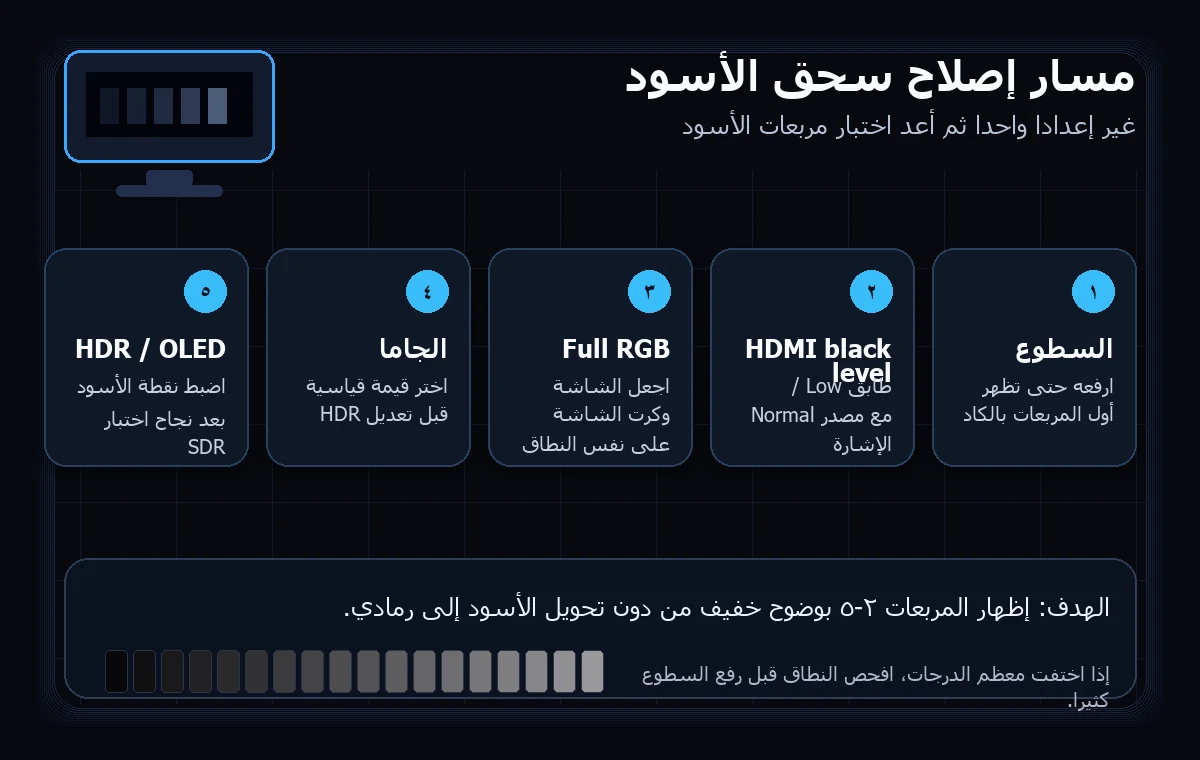
- غيّر إعدادا واحدا كل مرة: اضبط السطوع أو مستوى أسود HDMI أو نطاق إخراج بطاقة الرسوميات أو الجاما، ثم أعد الاختبار نفسه. توقف عندما تصبح المربعات 2 إلى 5 خافتة لكنها غير مختفية تماما.
طريقة قراءة النتيجة
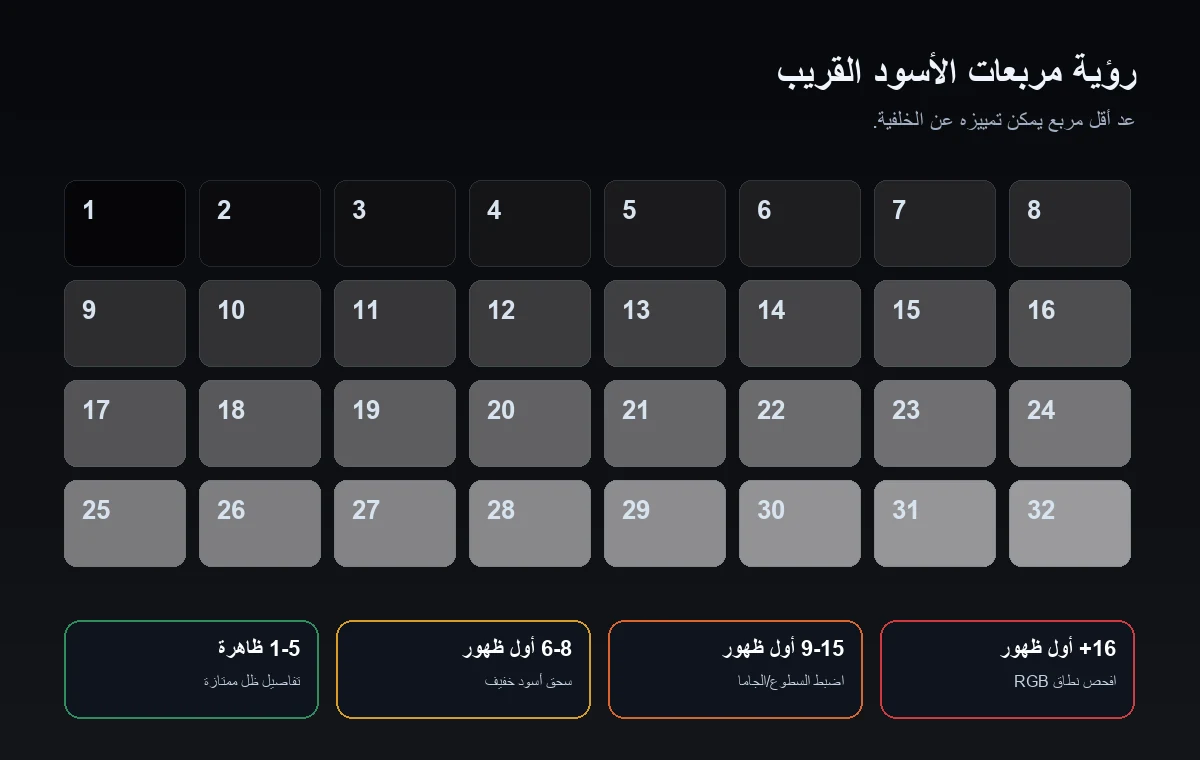
المربعات القريبة من الأسود يجب أن تكون بالكاد مرئية، لا ساطعة. المطلوب تمييزها عن الخلفية من دون تحويل الشاشة كلها إلى رمادي.
| أول مربع ظاهر | ما يعنيه غالبا | الإجراء التالي |
|---|---|---|
| 1-3 | تفاصيل الظلال ممتازة، أو قد يكون السطوع مرتفعا قليلا إذا بدا الأسود رماديا. | قارن النتيجة باختبار نطاق RGB حتى لا ترفع مستوى الأسود أكثر من اللازم. |
| 4-5 | وضع طبيعي أو سحق خفيف للأسود في كثير من الشاشات، خصوصا في غرفة مضيئة. | مناسب لمعظم الاستخدامات إذا بقيت الأنسجة ظاهرة في المشاهد الداكنة. |
| 6-8 | سحق خفيف للأسود يخفي أعمق درجات الظلال. | ارفع السطوع درجة أو درجتين وافحص الجاما ثم أعد الاختبار. |
| 9-15 | سحق متوسط للأسود يسبب فقدان تفاصيل الظلال في الألعاب والأفلام. | افحص أولا مستوى أسود HDMI وتطابق Full/Limited RGB في بطاقة الرسوميات. |
| 16+ | سحق شديد أو عدم تطابق في النطاق؛ كثير من التفاصيل الداكنة مقصوصة. | أعد وضع الصورة إلى الإعداد الافتراضي وطابق نطاق RGB ثم اختبر SDR من جديد قبل HDR. |
ترتيب إصلاح سحق الأسود
غيّر إعدادا واحدا ثم أعد الاختبار. انتقل للخطوة التالية فقط إذا بقيت المربعات المنخفضة مختفية.
ارفع السطوع حتى ينفصل المربع 2 أو 3 بالكاد عن الأسود ثم توقف. إذا أصبح الأسود رماديا فالسطوع مرتفع أكثر من اللازم أو نطاق RGB غير متطابق.
قد تسميه الشاشة Low أو Normal أو Limited أو Full أو Black Level. طابقه مع إعداد بطاقة الرسوميات بدلا من التخمين.
يناسب Full RGB 0-255 شاشة الكمبيوتر غالبا. إذا استخدم أحد الطرفين Limited 16-235 والآخر Full فقد تُسحق الظلال أو يبدو الأسود باهتا.
ابدأ بقيمة جاما قياسية. الجاما المرتفعة تعتم الدرجات المتوسطة والظلال، والمنخفضة تكشف التفاصيل لكنها قد تجعل الصورة مسطحة.
عاير SDR أولا. بعد ذلك اضبط نقطة الأسود في HDR وسطوع اللعبة بحيث يكون شعار المعايرة بالكاد مرئيا، لا واضحا ومريحا.
إذا لم يفد شيء، اختبر وضع Standard أو sRGB مع تعطيل التعتيم المحلي والتباين الديناميكي وتباين AI ومثبت الأسود.
OLED وHDR وVRR وإعدادات Black Stabilizer
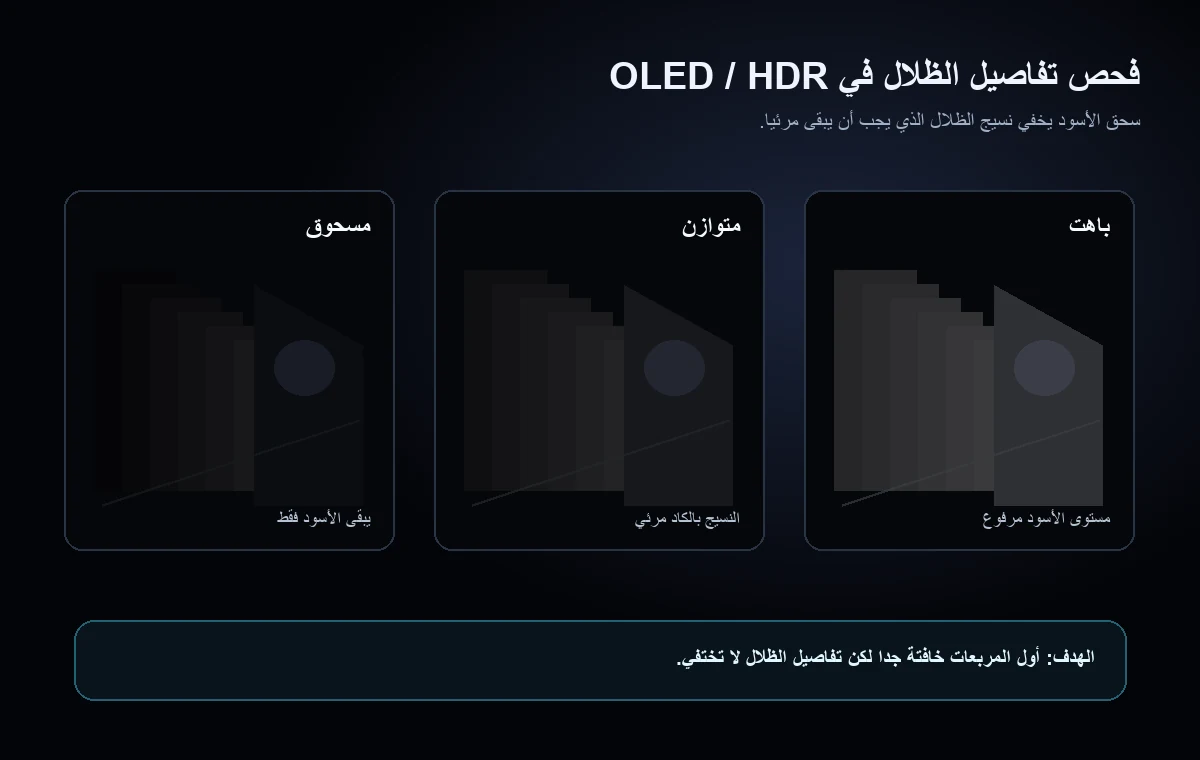
في OLED يكون الأسود الحقيقي عميقا جدا، لذلك تظهر مشكلات الدرجات القريبة من الأسود بسرعة. قد يخفي تخطيط درجات HDR أو الجاما أو VRR أو مثبت الأسود تفاصيل الظلال.
في OLED تنطفئ البكسلات عند الأسود الحقيقي، لذلك قد تكون القفزة من الأسود إلى أول درجة ظاهرة حادة. وهذا يجعل ضعف معايرة الدرجات القريبة من الأسود واضحا بسهولة.
قد يضغط HDR تفاصيل الظلال عندما تختلف إعدادات Windows HDR أو جهاز الألعاب أو منزلق اللعبة. تحقق من SDR أولا ثم اضبط HDR.
يتغير سلوك الدرجات القريبة من الأسود في بعض الشاشات عند تشغيل VRR أو Black Equalizer. أعد الاختبار مع تشغيل الوضع وإيقافه.
إذا فقدت منطقة واحدة فقط تفاصيل الظلال فشغّل أيضا اختبار تجانس الشاشة. إذا كان القص متساويا في الصورة كلها فالإعدادات هي الاحتمال الأقوى.
Black Crush أم أسود يبدو رماديا
سحق الأسود وظهور الأسود باللون الرمادي مشكلتان متعاكستان. الأولى تدمج درجات الظلال في الأسود، والثانية ترفع مستوى الأسود فيبدو رماديا. لتجنب تطبيق حل خاطئ، اختبر مستوى الأسود ونطاق RGB كلّا على حدة.
| العَرَض | ما تراه | الحل المرجح |
|---|---|---|
| سحق الأسود | تختفي المربعات ذات الأرقام المنخفضة داخل الأسود. | ارفع السطوع بحذر وطابق Full/Limited وخفّض الجاما القوية وأعد ضبط مثبت الأسود. |
| أسود باهت | تبدو الخلفية السوداء رمادية أو ضبابية. | أصلح عدم تطابق Full/Limited وخفّض السطوع وافحص HDR والتعتيم المحلي وانعكاسات الغرفة. |
| تسرب الإضاءة / التوهج | تبدو الزوايا أو الحواف أكثر سطوعا من الوسط. | استخدم اختبار تجانس الشاشة أو دليل تسرب الإضاءة؛ لا تستطيع الإعدادات إزالة تسرب اللوحة بالكامل. |
ابدأ بـاختبار مستوى الأسود. إذا نجحت المربعات لكن الأسود ما زال يبدو غير صحيح، شغّل اختبار نطاق RGB واختبار جاما الشاشة قبل تغيير إعدادات كل لعبة. ولخطوات قراءة جاما 2.2 كاملة، استخدم دليل اختبار جاما الشاشة وغيّر إعدادا واحدا في مسار العرض كل مرة.
فيديو: مشكلة OLED black crush وطريقة إصلاحها
يشرح هذا الفيديو لماذا قد تخفي معالجة الدرجات القريبة من الأسود في OLED تفاصيل الظلال، ويوضح الأعراض البصرية التي يستهدفها هذا الدليل.
المصادر والملاحظات
تدعم هذه المراجع طريقة الاختبار وتفسير مربعات الدرجات القريبة من الأسود وترتيب الإعدادات العملي. قد تختلف النتيجة حسب نوع اللوحة والمعايرة وتعريف بطاقة الرسوميات وإضاءة الغرفة.
- TFTCentral - سحق الأسود وتفاصيل الظلال في OLEDيشرح لماذا قد تخفي معالجة الدرجات القريبة من الأسود في OLED تفاصيل الظلال وطريقة اختبارها.
- اختبار الشاشة من EIZOأنماط آمنة تعمل في المتصفح لفحص الجاما والتدرج الرمادي ومستوى الأسود.
- مستويات الأسود من Blur Busters TestUFOمرجع يعمل في المتصفح لفحص ظهور المربعات الداكنة.
- KTC - أسباب سحق الأسودنظرة عملية إلى إعدادات مستوى الأسود والسطوع والجاما التي تسبب فقدان الظلال.
- نقاش سحق الأسود في Reddit OLED Gamingأمثلة حقيقية من المستخدمين لتفسير اختبارات الدرجات القريبة من الأسود في شاشات OLED الحديثة للألعاب.
- اختبار مستوى الأسود من KeyboardTester.clickالاختبار الداخلي المستخدم في هذا الدليل.
أدوات مرتبطة
عدّ مربعات الدرجات القريبة من الأسود وتأكد هل تفاصيل الظلال مقصوصة.
اختبار نطاق RGBاكتشف عدم تطابق Full وLimited RGB الذي يسحق الأسود أو يجعله باهتا.
اختبار جاما الشاشةتحقق هل تجعل الجاما الظلال داكنة جدا أو مسطحة أكثر من اللازم.
اختبار تجانس الشاشةميّز مشكلات تجانس اللوحة عن إعداد مستوى الأسود العام.
أدلة مرتبطة
استخدم هذا الدليل إذا كان الأسود مرتفعا أو التباين ضبابيا أو الصورة باهتة.
اختبار احتراق OLEDافحص احتباس الصورة المؤقت والاحتراق الدائم بعيدا عن مشكلة سحق الأسود.
دليل تسرب الإضاءة الخلفيةشخّص توهج الزوايا وIPS glow والتسرب الذي قد يستدعي إرجاع الشاشة.
اختبار ظلال الحركة في الشاشةاضبط Overdrive بعد التأكد من صحة مستوى الأسود.
أسئلة شائعة
- ما معنى black crush؟هو اختفاء التفاصيل القريبة من الأسود وتحولها إلى كتلة سوداء واحدة بدلا من درجات ظل منفصلة.
- كيف أعرف أن شاشتي تعاني من black crush؟شغّل اختبار مستوى الأسود وانظر إلى أول مربع ظاهر. إذا كان أول رقم ظاهر 9 أو أعلى فهناك فقدان واضح لتفاصيل الظلال.
- هل أرفع السطوع فقط؟ارفع السطوع حتى تظهر أول المربعات بالكاد. إذا أصبح الأسود رماديا، افحص HDMI black level ونطاق Full/Limited RGB.
- هل black crush طبيعي في OLED؟قد تكون معالجة الدرجات القريبة من الأسود أصعب في OLED، لكن السحق الشديد ليس طبيعيا. افحص SDR أولا ثم اضبط HDR ونقطة الأسود في اللعبة.
- هل يغني اختبار المتصفح عن المعايرة الاحترافية؟لا. الاختبار تشخيص عملي وليس قياسا بجهاز معايرة، لكنه يكشف بسرعة إن كانت الإعدادات الحالية تقص تفاصيل الظلال.
- ما الفرق بين سحق الأسود والأسود الباهت؟سحق الأسود يحول عدة درجات داكنة إلى أسود خالص فتختفي التفاصيل. أما الأسود الباهت فيرفع مستوى الأسود كله فيبدو رماديا. يختلف الحل، لذلك افحص مستوى الأسود ونطاق RGB معا.
ابدأ بـاختبار مستوى الأسود. إذا نجحت المربعات لكن الأسود ما زال يبدو غير صحيح، شغّل اختبار نطاق RGB واختبار جاما الشاشة قبل تغيير إعدادات كل لعبة. ولخطوات قراءة جاما 2.2 كاملة، استخدم دليل اختبار جاما الشاشة وغيّر إعدادا واحدا في مسار العرض كل مرة.