Free AI assistant that helps you pick the right hardware test, explains results, and walks through keyboard, mouse, screen, and audio diagnostics in 10 languages — in-browser, no sign-up.
Ask in plain English (or Spanish, French, German, Japanese, Korean, Portuguese, Arabic) which hardware test fits your problem — the AI walks you through it and explains the result.
Emily online
Emily
Emily helps users find the right keyboard, mouse, screen, audio, or utility test and understand what to do next.
Ava online
Ava
Ava gives visitors another friendly way to start getting help with device checks and troubleshooting.
🧠
Knows every tool
Guides you to the right test from 37+ tools on the site.
No account. Recent history stays in your browser; submitted messages are sent to Groq to generate replies.
⚡
Fast
Groq-hosted model — answers in ~1 second on a good connection.
Try asking:
"My arrow keys sometimes don't register — which test should I run?"
"How do I check if my headphones play true stereo?"
"Is there a dead pixel on my monitor?"
"What's a good click-per-second for a gaming mouse?"
"Show me how to measure input latency."
The assistant points you at the exact tool, links you to it, and explains what the result means once you're done.
Was this tool helpful?Rate AI Assistant:5.0(1 rating)Thanks for rating!
AI Assistant guide
How to use the AI Assistant accurately
Free AI assistant that helps you pick the right hardware test, explains results, and walks through keyboard, mouse, screen, and audio diagnostics in 10 languages — in-browser, no sign-up.
01Start the live tool
Open the test area and follow the on-screen controls before drawing conclusions.
02Run one clean pass
Keep input steady so the result is useful for comparison and troubleshooting.
03Repeat the check
Run another pass if browser focus, permissions, or hardware settings changed.
04Compare with related tools
Use the related diagnostics to confirm whether the issue belongs to the device or the browser.
Yes. The assistant is free, requires no account, and has no paywall. A rate limit of 12 messages per minute per visitor exists only to keep the service fast and prevent abuse — it resets every minute.
Which AI model powers the assistant?
The assistant runs on a Groq-hosted large language model. Groq provides sub-second inference speeds on open LLMs, which is why answers arrive in about a second. The model is not GPT-4 or Claude Opus — it is a mid-sized LLM tuned for fast, focused responses within our hardware-testing domain.
What languages does the AI assistant support?
Ten languages: English, Spanish, French, German, Indonesian, Japanese, Korean, Portuguese, Arabic, and Russian. Tap the 🌐 button in the chat header to switch. Tool links in the AI responses automatically route to the localized version of the site where available.
How is my AI Assistant conversation handled?
Recent chat history is stored in your browser localStorage and can persist after a reload. When you send a message, that message and recent context are sent through the KeyboardTester.click endpoint to Groq to generate the reply. The application does not intentionally keep a server-side transcript, but you should not submit passwords or other sensitive information.
What can the AI assistant help me with?
It is scoped to hardware testing on KeyboardTester.click: picking the right diagnostic tool based on your symptom, explaining technical terms like ghosting or N-key rollover, interpreting test results, and routing you to the correct test page. It will decline off-topic questions (politics, coding, homework, general trivia) — for those, a general AI chatbot like ChatGPT or Claude is a better fit.
Does the AI replace the test tools themselves?
No. The tools are the actual diagnostic. The AI assistant is a guide layer on top — it tells you which test to run and what the numbers mean, but the testing itself happens in the browser-based tools (keyboard tester, mouse tester, screen tester, etc.).
Windows app
KeyboardTester.click is available from Microsoft Store
Install the official Windows app shortcut, or keep using the same free testing tools in your browser.
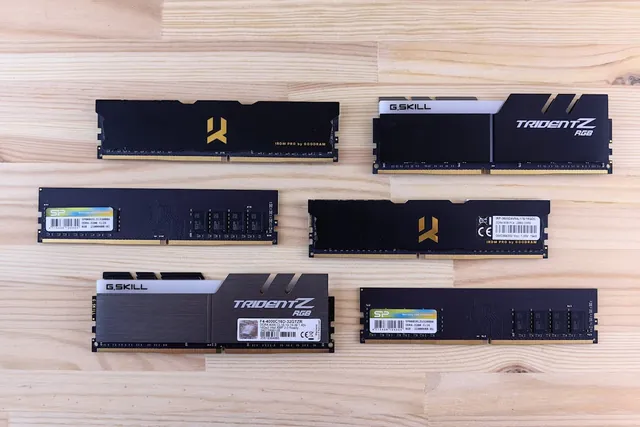
01 / 10DDR5 buying mathPay $120 more for 2 nanoseconds?CL30 vs CL36 looks big on the box. The real difference is 2 nanoseconds.02 / 10What CL really isCAS latency counts cycles, not timeCL is how many clock ticks the RAM waits before answering. Ticks get faster with speed.03 / 10The one-line formulans = 2000 x CL / MT/sTrue latency in nanoseconds. DDR5-6000 CL30: 2000 x 30 / 6000 = 10.0 ns.04 / 10CL30 vs CL36 at 600010.0 ns versus 12.0 nsSame speed, different CL: the whole debate is about 2 nanoseconds of wait time.05 / 10The tie surprise7200 CL36 is also 10.0 nsSo is 6400 CL32. A higher CL on a faster kit can match a lower CL exactly.06 / 10What 2 ns buys in gamesRoughly 1-4% average FPSOnly when CPU-bound, and benchmarks disagree. Smoother 1% lows are the steadier win.07 / 10Price check, Aug 11, 2026The CL30 premium: $120G.Skill CL30 $599.99 vs CL36 $479.99. A Patriot CL30 kit: $429.99. Shop across brands.08 / 10The EXPO/XMP gotchaYour CL30 may be running CL40Kits boot at JEDEC defaults until you enable EXPO or XMP in BIOS. Check yours today.09 / 10The X3D exceptionBig cache blunts CLOn 7800X3D-class CPUs, the stacked cache blunts CL gains. Buy CL36 and save.10 / 10The verdictSmall delta: yes. Upgrade: no.Compare your two kits in real nanoseconds - presets loaded, math done for you.
01 / 10Phone vibration testYour phone stopped buzzingBefore you book a repair, find out whether it is the motor or just a setting.02 / 10The symptomMissed calls and silent alertsA dead motor is easy to miss. You only notice the calls you never felt arrive.03 / 10What is insideA tiny weight on a motorMost phones spin an offset weight or drive a linear actuator to make the buzz.04 / 10Check this firstSettings fake a dead motorSilent mode, Do Not Disturb and per-app vibration all switch the buzz off.05 / 10Run the testOne tap, three patternsThe browser asks the phone to vibrate in short, long and pulsed patterns.06 / 10Result: weakYou feel it, but barelyA faint buzz often means a loose motor mount or a case damping the vibration.07 / 10Result: nothingNo buzz on any patternWith settings ruled out, silence points at the motor or its connector.08 / 10Result: on and offIt works, then it does notIntermittent buzzing usually means a failing solder joint or a worn motor.09 / 10One honest limitiPhones cannot run this testSafari on iOS does not support the browser vibration API, so use Android.10 / 10Your turnFind out in thirty secondsRun the three patterns, then decide whether it is a setting or the hardware.